

Client Support
Function Keys

Re: Function Keys
2 years 5 months ago
That's exactly the issue...nothing is in the log. F2 doesn't register at all. F1 and F3 show the proper commands.
Please Log in or Create an account to join the conversation.

Re: Function Keys
2 years 5 months ago
Tried to set up the commands to no avail.
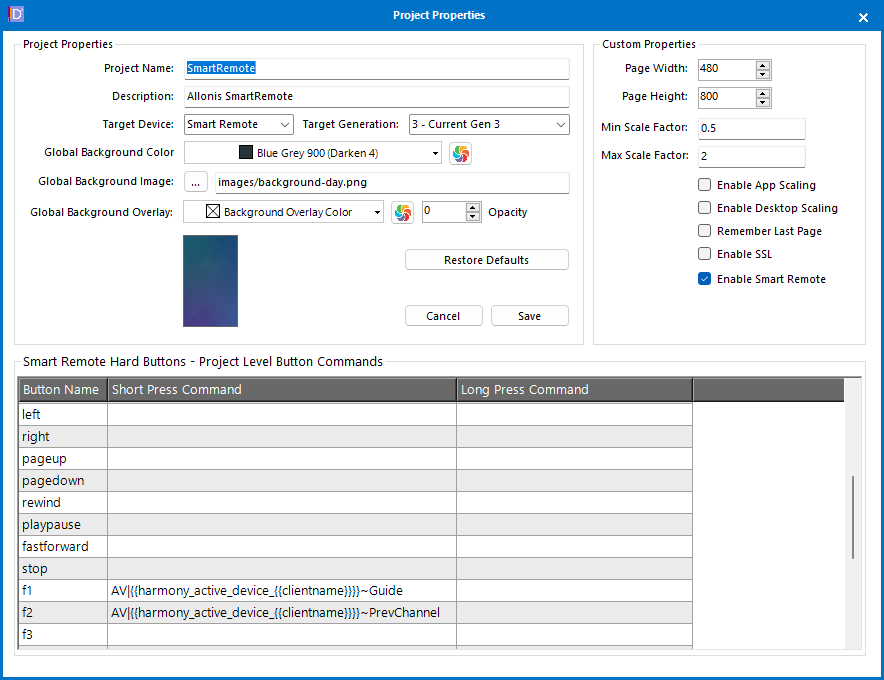
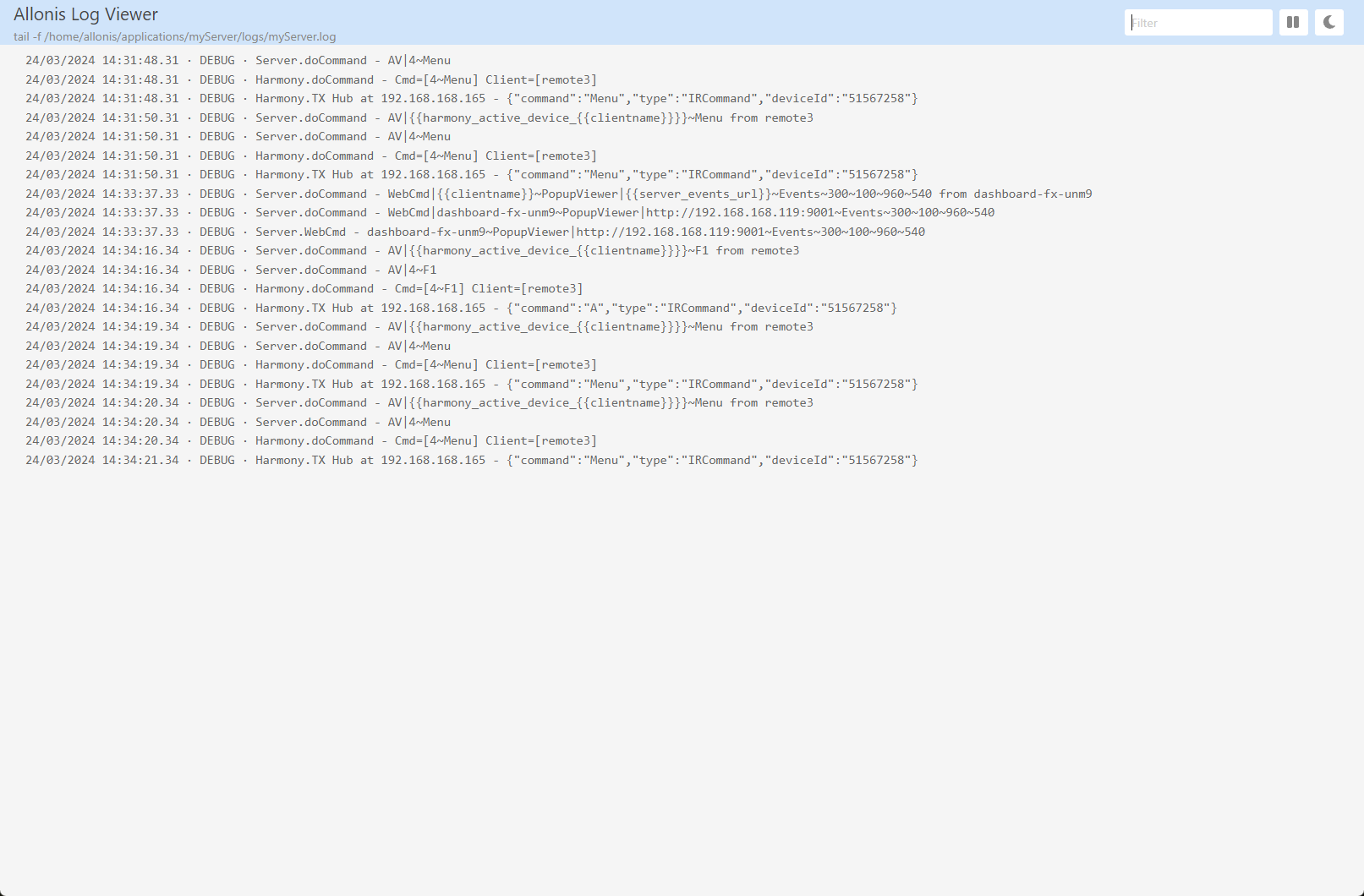
The log file and screenshot of the commands are attached. No idea where I went astray.
The rest of by harmony implementation is 100%. i would just like be able to assign these functions.
The log file and screenshot of the commands are attached. No idea where I went astray.
The rest of by harmony implementation is 100%. i would just like be able to assign these functions.
Please Log in or Create an account to join the conversation.

Re: Function Keys
2 years 5 months ago
Thanks for that log it told me exactly what is happening.
The Fn buttons being set to Guide and PrevChannel are syntactically correct. However, the Harmony driver has no such commands for Guide and PrevChannel. That's why nothing is happening.
Prior to today the Harmony driver only tried to map Harmony commands to the existing SmartRemote hard buttons. The reason was that any of the missing commands would be available on the remote's touchscreen.
If you wanted to send any of the other commands to the Harmony you would have to decode the command to its native Press button command.
I just released an updated Harmony driver and it adds 24 new native commands. The new commands are
SELECTKEY, CHANNELUP, CHANNELDOWN, GUIDE, *, PREVCHANNEL, RECORD, A, B, C, D, LIST, LIVE, FAVORITE, INFO, EXIT
PAGEUP, PAGEDOWN, TUNEUP, TUNEDOWN, GREEN, RED, BLUE and YELLOW
This should round out the basic set of the most used commands.
Give the updated driver and see if it works better. Let us know if there are any additional Harmony commands that should be elevated to native driver commands.
The Fn buttons being set to Guide and PrevChannel are syntactically correct. However, the Harmony driver has no such commands for Guide and PrevChannel. That's why nothing is happening.
Prior to today the Harmony driver only tried to map Harmony commands to the existing SmartRemote hard buttons. The reason was that any of the missing commands would be available on the remote's touchscreen.
If you wanted to send any of the other commands to the Harmony you would have to decode the command to its native Press button command.
I just released an updated Harmony driver and it adds 24 new native commands. The new commands are
SELECTKEY, CHANNELUP, CHANNELDOWN, GUIDE, *, PREVCHANNEL, RECORD, A, B, C, D, LIST, LIVE, FAVORITE, INFO, EXIT
PAGEUP, PAGEDOWN, TUNEUP, TUNEDOWN, GREEN, RED, BLUE and YELLOW
This should round out the basic set of the most used commands.
Give the updated driver and see if it works better. Let us know if there are any additional Harmony commands that should be elevated to native driver commands.
The following user(s) said Thank You: CrabbyPatties
Please Log in or Create an account to join the conversation.
Re: Function Keys
2 years 5 months ago
Thank you. I updated the Harmony driver. Made no changes to the commands since you indicated they were properly formatted
Still no response.
F1 brings up the supplemental audio menu
F2 no response.
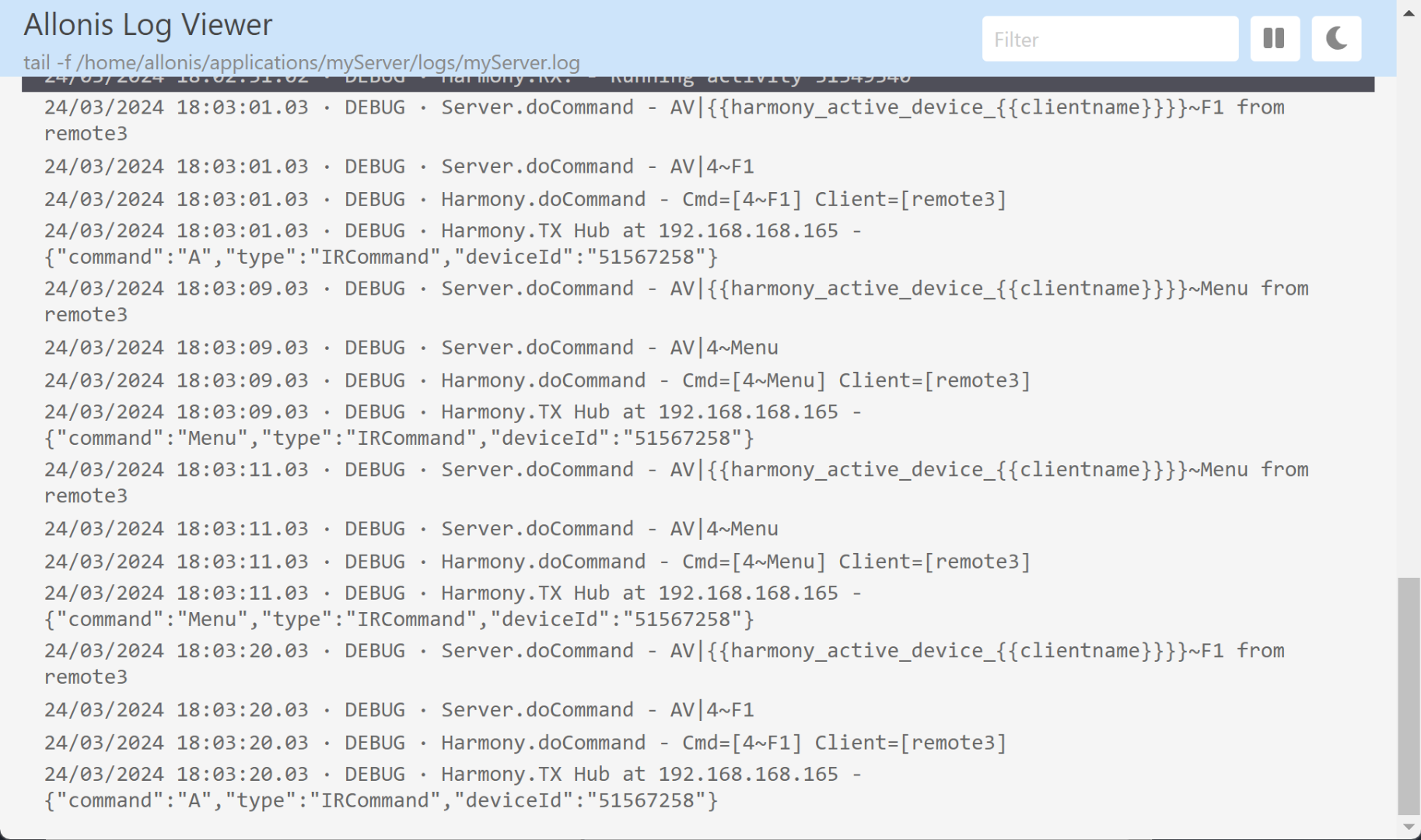
Log attached
Still no response.
F1 brings up the supplemental audio menu
F2 no response.
Log attached
Please Log in or Create an account to join the conversation.
Re: Function Keys
2 years 5 months ago - 2 years 5 months ago
Evidently I was looking at another person's logs. Your remote is issuing F1 commands.
There is no native Harmony F1, F2, F3 commands. Unless you change them those keys will map to the Harmony A, B and C commands.
If you want them to perform special functions then map them to one of the other commands that you need.
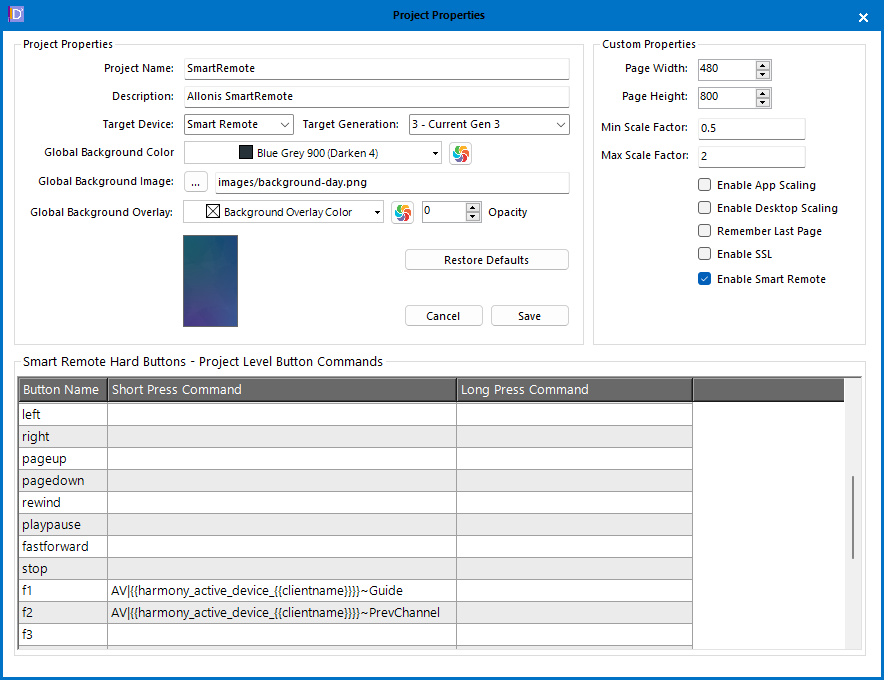
AV|{{harmony_active_device_{{clientname}}}}~F1 change F1 to the command you want to issue. Repeat for F2 and F3
There is no native Harmony F1, F2, F3 commands. Unless you change them those keys will map to the Harmony A, B and C commands.
If you want them to perform special functions then map them to one of the other commands that you need.
AV|{{harmony_active_device_{{clientname}}}}~F1 change F1 to the command you want to issue. Repeat for F2 and F3
Last edit: 2 years 5 months ago by davep.
Please Log in or Create an account to join the conversation.
Re: Function Keys
2 years 5 months ago
The commands I used match what you suggested. See image.
What did I do incorrectly?
I get the SAP mention with F1 and nothing with F2.
I have updated to the latest myserver and Harmony.
What did I do incorrectly?
I get the SAP mention with F1 and nothing with F2.
I have updated to the latest myserver and Harmony.
Please Log in or Create an account to join the conversation.
Time to create page: 0.314 seconds

Copyright © 2026 Allonis. All Rights Reserved.