

Client Support
Software Updates


Re: Software Updates
2 years 6 months ago
The "active folder" is the wwwroot folder. That is where myServer and myDesigner expect to find web templates that are in use.
Please Log in or Create an account to join the conversation.


Please Log in or Create an account to join the conversation.
Re: Software Updates
2 years 5 months ago
Today's Designer update adds hard button emulation when you preview a SmartRemote project using the Designer's Launch command.
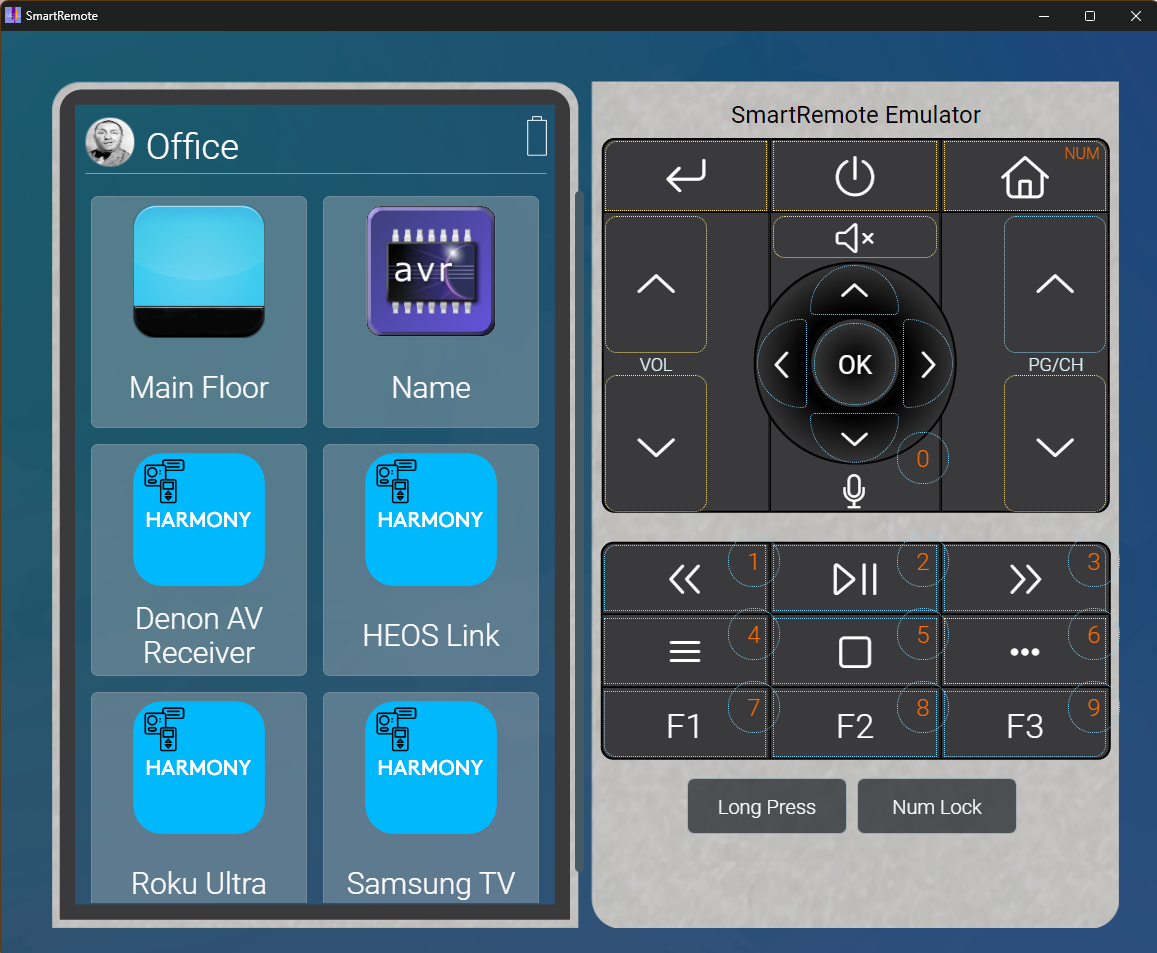
The Buttons labeled Long Press and Num Lock are used to toggle those button states. Now you will be able to fully test your SmartRemote projects without have to stop to reach for the remote.
The Buttons labeled Long Press and Num Lock are used to toggle those button states. Now you will be able to fully test your SmartRemote projects without have to stop to reach for the remote.
Please Log in or Create an account to join the conversation.
Re: Software Updates
2 years 5 months ago
A new "Master Image" was released today that has some TeamViewer fixes (turns off IPV6 networking). You can manually update your own system by going to
allonis.com/support/documentation?view=category&id=412
All the way to the bottom for the fixes.
Recommended if you need Remote Assistance from Allonis.
allonis.com/support/documentation?view=category&id=412
All the way to the bottom for the fixes.
Recommended if you need Remote Assistance from Allonis.
Please Log in or Create an account to join the conversation.
Re: Software Updates
2 years 5 months agoThe ipv6 disable procedure in the above referenced documentation did not disable ipv6 on my Allonis shelf mount server. My determination that ipv6 was not disabled was made by viewing ifconfig output and by successfully doing a ping6 of another server. I carefully checked the command syntax and the lines had been entered correctly. I was able to disable ipv6 by adding "ipv6.disable=1" to the line of text in "/boot/firmware/cmdline.txt. This is the same file that there is a suggested change regarding HDMI in the above documentation.A new "Master Image" was released today that has some TeamViewer fixes (turns off IPV6 networking). You can manually update your own system by going to
allonis.com/support/documentation?view=category&id=412
All the way to the bottom for the fixes.
Recommended if you need Remote Assistance from Allonis.
Please Log in or Create an account to join the conversation.
Re: Software Updates
2 years 5 months agoThe "ipv6.disable=1" added to cmdline.txt did disable ipv6 from an interface standpoint, but the change caused problems with myServer getting an error when shutting down and a different error when starting up. I removed the "ipv6.disable=1" change and did the ipv6 disable via the desktop interface (click on network icon, go to Advanced options, choose the network (eth0 in my case), navigate to the IPv6 Settings tab and select disabled, and save the changes). Disabling IPv6 via the desktop interface worked for disabling IPv6, and it did not cause errors in myServer.The ipv6 disable procedure in the above referenced documentation did not disable ipv6 on my Allonis shelf mount server. My determination that ipv6 was not disabled was made by viewing ifconfig output and by successfully doing a ping6 of another server. I carefully checked the command syntax and the lines had been entered correctly. I was able to disable ipv6 by adding "ipv6.disable=1" to the line of text in "/boot/firmware/cmdline.txt. This is the same file that there is a suggested change regarding HDMI in the above documentation.
Please Log in or Create an account to join the conversation.
Time to create page: 0.296 seconds

Copyright © 2026 Allonis. All Rights Reserved.