

Client Support
Adding a menu item to the web dashboard


Adding a menu item to the web dashboard
1 year 7 months ago - 1 year 7 months ago
Not for the faint hearted and not recommended if you don't know what you are doing...
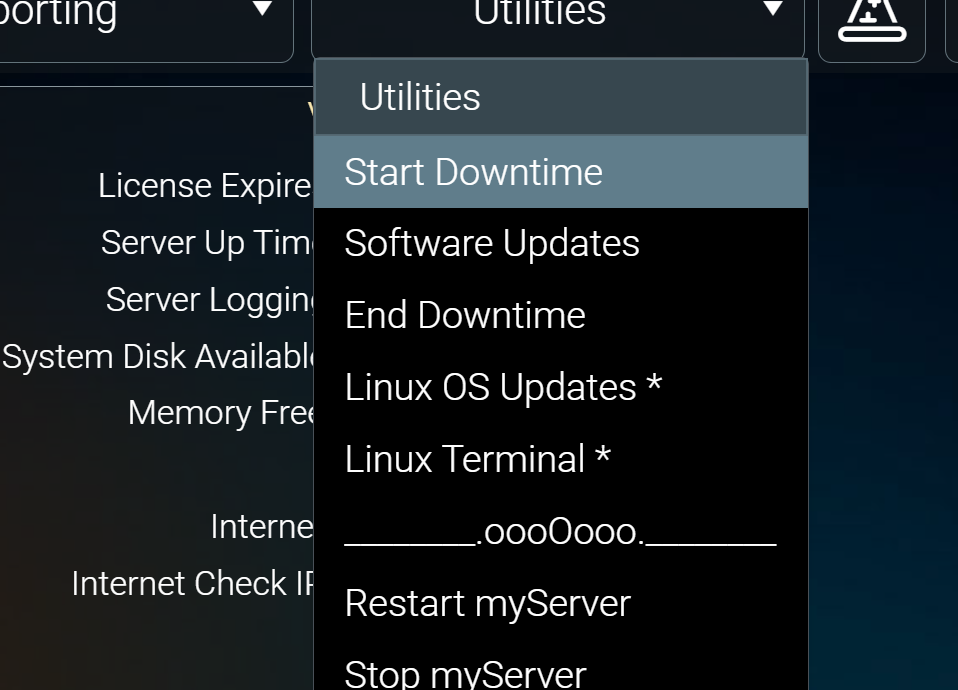
With that said, I've added a couple of menu items to the myServer web dashboard. Now I've got a (hopefully) stable myServer installation running on a VM and monitoring of it from a checkmk server I don't want any false alarms about myServer going down when I'm just updating core software, drivers or templates. So I've cooked up a script that will start a checkmk scheduled downtime for the host. Then I created a myServer macro that runs the script using RunParseResults. Finally I've patched the overlay-header.html file in /home/allonis/applications/myServer/wwwroot/dashboard to add a menu command to run that macro. Now when I'm about to update myServer I just pick the 'Start Downtime' menu and it runs my script, and no false alarms.
Obviously you can generalise this to have menu items do whatever you want.
I'm assuming it will get overwritten each time I update to a new version of myServer so the patch will need reapplying each time.
Macro called 'downtimestart':
diff to apply to overlay-header.html:
--- overlay-header.html.old 2024-12-23 17:10:34.000000000 +0000
+++ overlay-header.html 2025-02-02 09:46:24.833320114 +0000
@@ -6,3 +6,3 @@
<ui-dropdown id="172392d39e5101deb" width="260" height="56" left="688" top="6" borderradii="7 7 7 7" backgroundcolor="rgba(21,27,31,0.48)" borders="1px solid rgba(144,164,174,0.65)" label="Reporting" fontfamily="Roboto" fontsize="20" fontweight="300" fontcolor="rgba(255,255,255,1.00)" statics="[{`name`:`Device Inventory`,`value`:`loadscene|deviceinventory`},{`name`:`System Events`,`value`:`loadscene|events`},{`name`:`Insert Event Marker`,`value`:`InsertMarker`}]" servercmd="value" centered="1" showindicator="0"></ui-dropdown>
-<ui-dropdown id="172392d39e986440a" width="260" height="56" left="958" top="6" borderradii="7 7 7 7" backgroundcolor="rgba(21,27,31,0.48)" borders="1px solid rgba(144,164,174,0.65)" label="Utilities" fontfamily="Roboto" fontsize="20" fontweight="300" fontcolor="rgba(255,255,255,1.00)" statics="[{`name`:`Software Updates`,`value`:`Loadscene|softwareupdates`},{`name`:`Linux OS Updates *`,`value`:`Loadscene|osupdates`},{`name`:`Linux Terminal *`,`value`:`Loadscene|terminal`},{`name`:`________.oooOooo.________`,`value`:`_`},{`name`:`Restart myServer`,`value`:`Restart`},{`name`:`Stop myServer`,`value`:`Shutdown`},{`name`:`Power Off Host`,`value`:`PowerOff`},{`name`:`Reboot Host`,`value`:`Reboot`},{`name`:`*Allonis Hardware Only`,`value`:`_`}]" servercmd="value" centered="1" showindicator="0"></ui-dropdown>
+<ui-dropdown id="172392d39e986440a" width="260" height="56" left="958" top="6" borderradii="7 7 7 7" backgroundcolor="rgba(21,27,31,0.48)" borders="1px solid rgba(144,164,174,0.65)" label="Utilities" fontfamily="Roboto" fontsize="20" fontweight="300" fontcolor="rgba(255,255,255,1.00)" statics="[{`name`:`Start Downtime`,`value`:`downtimestart`},{`name`:`Software Updates`,`value`:`Loadscene|softwareupdates`},{`name`:`End Downtime`,`value`:`downtimeend`},{`name`:`Linux OS Updates *`,`value`:`Loadscene|osupdates`},{`name`:`Linux Terminal *`,`value`:`Loadscene|terminal`},{`name`:`________.oooOooo.________`,`value`:`_`},{`name`:`Restart myServer`,`value`:`Restart`},{`name`:`Stop myServer`,`value`:`Shutdown`},{`name`:`Power Off Host`,`value`:`PowerOff`},{`name`:`Reboot Host`,`value`:`Reboot`},{`name`:`*Allonis Hardware Only`,`value`:`_`}]" servercmd="value" centered="1" showindicator="0"></ui-dropdown>
<ui-button id="172c433e947e278b" width="56" height="56" left="1226" top="6" borderradii="7 7 7 7" backgroundcolor="rgba(21,27,31,0.48)" borders="1px solid rgba(144,164,174,0.65)" outline="none" fontfamily="Roboto" fontsize="36" fontweight="400" fontcolor="rgba(255,255,255,1.00)" icon="fal.hat-wizard" clientcmd="Toggle|overlay-commands"></ui-button>
With that said, I've added a couple of menu items to the myServer web dashboard. Now I've got a (hopefully) stable myServer installation running on a VM and monitoring of it from a checkmk server I don't want any false alarms about myServer going down when I'm just updating core software, drivers or templates. So I've cooked up a script that will start a checkmk scheduled downtime for the host. Then I created a myServer macro that runs the script using RunParseResults. Finally I've patched the overlay-header.html file in /home/allonis/applications/myServer/wwwroot/dashboard to add a menu command to run that macro. Now when I'm about to update myServer I just pick the 'Start Downtime' menu and it runs my script, and no false alarms.
Obviously you can generalise this to have menu items do whatever you want.
I'm assuming it will get overwritten each time I update to a new version of myServer so the patch will need reapplying each time.
Macro called 'downtimestart':
Code:
Macro|
RunParseResults|/home/allonis/scripts/startdowntime.sh~~mydowntimestart
diff to apply to overlay-header.html:
--- overlay-header.html.old 2024-12-23 17:10:34.000000000 +0000
+++ overlay-header.html 2025-02-02 09:46:24.833320114 +0000
@@ -6,3 +6,3 @@
<ui-dropdown id="172392d39e5101deb" width="260" height="56" left="688" top="6" borderradii="7 7 7 7" backgroundcolor="rgba(21,27,31,0.48)" borders="1px solid rgba(144,164,174,0.65)" label="Reporting" fontfamily="Roboto" fontsize="20" fontweight="300" fontcolor="rgba(255,255,255,1.00)" statics="[{`name`:`Device Inventory`,`value`:`loadscene|deviceinventory`},{`name`:`System Events`,`value`:`loadscene|events`},{`name`:`Insert Event Marker`,`value`:`InsertMarker`}]" servercmd="value" centered="1" showindicator="0"></ui-dropdown>
-<ui-dropdown id="172392d39e986440a" width="260" height="56" left="958" top="6" borderradii="7 7 7 7" backgroundcolor="rgba(21,27,31,0.48)" borders="1px solid rgba(144,164,174,0.65)" label="Utilities" fontfamily="Roboto" fontsize="20" fontweight="300" fontcolor="rgba(255,255,255,1.00)" statics="[{`name`:`Software Updates`,`value`:`Loadscene|softwareupdates`},{`name`:`Linux OS Updates *`,`value`:`Loadscene|osupdates`},{`name`:`Linux Terminal *`,`value`:`Loadscene|terminal`},{`name`:`________.oooOooo.________`,`value`:`_`},{`name`:`Restart myServer`,`value`:`Restart`},{`name`:`Stop myServer`,`value`:`Shutdown`},{`name`:`Power Off Host`,`value`:`PowerOff`},{`name`:`Reboot Host`,`value`:`Reboot`},{`name`:`*Allonis Hardware Only`,`value`:`_`}]" servercmd="value" centered="1" showindicator="0"></ui-dropdown>
+<ui-dropdown id="172392d39e986440a" width="260" height="56" left="958" top="6" borderradii="7 7 7 7" backgroundcolor="rgba(21,27,31,0.48)" borders="1px solid rgba(144,164,174,0.65)" label="Utilities" fontfamily="Roboto" fontsize="20" fontweight="300" fontcolor="rgba(255,255,255,1.00)" statics="[{`name`:`Start Downtime`,`value`:`downtimestart`},{`name`:`Software Updates`,`value`:`Loadscene|softwareupdates`},{`name`:`End Downtime`,`value`:`downtimeend`},{`name`:`Linux OS Updates *`,`value`:`Loadscene|osupdates`},{`name`:`Linux Terminal *`,`value`:`Loadscene|terminal`},{`name`:`________.oooOooo.________`,`value`:`_`},{`name`:`Restart myServer`,`value`:`Restart`},{`name`:`Stop myServer`,`value`:`Shutdown`},{`name`:`Power Off Host`,`value`:`PowerOff`},{`name`:`Reboot Host`,`value`:`Reboot`},{`name`:`*Allonis Hardware Only`,`value`:`_`}]" servercmd="value" centered="1" showindicator="0"></ui-dropdown>
<ui-button id="172c433e947e278b" width="56" height="56" left="1226" top="6" borderradii="7 7 7 7" backgroundcolor="rgba(21,27,31,0.48)" borders="1px solid rgba(144,164,174,0.65)" outline="none" fontfamily="Roboto" fontsize="36" fontweight="400" fontcolor="rgba(255,255,255,1.00)" icon="fal.hat-wizard" clientcmd="Toggle|overlay-commands"></ui-button>
Last edit: 1 year 7 months ago by andrew.
The following user(s) said Thank You: bowlingbeeg
Please Log in or Create an account to join the conversation.
Re: Adding a menu item to the web dashboard
1 year 7 months ago
Actually there might be a feature request here - allow us to configure a certain number of user commands to go on the utilities menu. Each one calls a macro that does what you want.
Please Log in or Create an account to join the conversation.
Re: Adding a menu item to the web dashboard
1 year 7 months ago - 1 year 7 months ago
Make a patch:
Apply the patch (patch-dashboard-menu.sh):
myServer macro to apply the patch:
Code:
#!/bin/sh
cd ~allonis/applications/myServer/wwwroot/dashboard
diff -Naur overlay-header.html.old overlay-header.html > ~allonis/patches/dashboard-menu.patch
Code:
#!/bin/sh
cd ~allonis/applications/myServer/wwwroot/dashboard
patch -ufN overlay-header.html ~allonis/patches/dashboard-menu.patch
Code:
Macro|
RunParseResults|/home/allonis/scripts/patch-dashboard-menu.sh~~mypatchmenuresult
Last edit: 1 year 7 months ago by andrew.
Please Log in or Create an account to join the conversation.
Time to create page: 0.249 seconds

Copyright © 2026 Allonis. All Rights Reserved.