

Client Support
Cannot add device

Re: Cannot add device
2 years 6 months ago - 2 years 6 months ago
The last two source commands worked.
It did take two HDMI2 commands for it to change, but only one HDMI1 command.
It did take two HDMI2 commands for it to change, but only one HDMI1 command.
Last edit: 2 years 6 months ago by Fattykidd.
Please Log in or Create an account to join the conversation.

Re: Cannot add device
2 years 6 months ago
Ok, I found on the Interwebs that the projector needs a super secret handshake. You must first send a PJREQ and if it gives you permission then you can send a real command. The driver is now sending the handshake sequence.
Please Log in or Create an account to join the conversation.
Re: Cannot add device
2 years 6 months ago - 2 years 6 months agoThank you Dave.Ok, I found on the Interwebs that the projector needs a super secret handshake. You must first send a PJREQ and if it gives you permission then you can send a real command. The driver is now sending the handshake sequence.
The power off command works perfectly as well.
Last edit: 2 years 6 months ago by Fattykidd.
Please Log in or Create an account to join the conversation.

Re: Cannot add device
2 years 6 months ago
While you're in making changes can you add the password that's required on all of the newer JVC projectors? Pretty please 
Please Log in or Create an account to join the conversation.
Re: Cannot add device
2 years 6 months ago
Saw someone logged in and did some more work with the JVC driver and transferred some files.
May I ask what you were up to ?
May I ask what you were up to ?
Please Log in or Create an account to join the conversation.
Re: Cannot add device
2 years 6 months ago - 2 years 6 months ago
I was refining the driver to finish making changes.
The driver has been updated and it will now track power state. It will also support sending a password if the projector requires it. The AddProjector command now supports an optional password parameter. If you projector does not need a password leave it blank.
Finally the command builder overlay exposes a side panel so that you can directly test command and control of the projector.
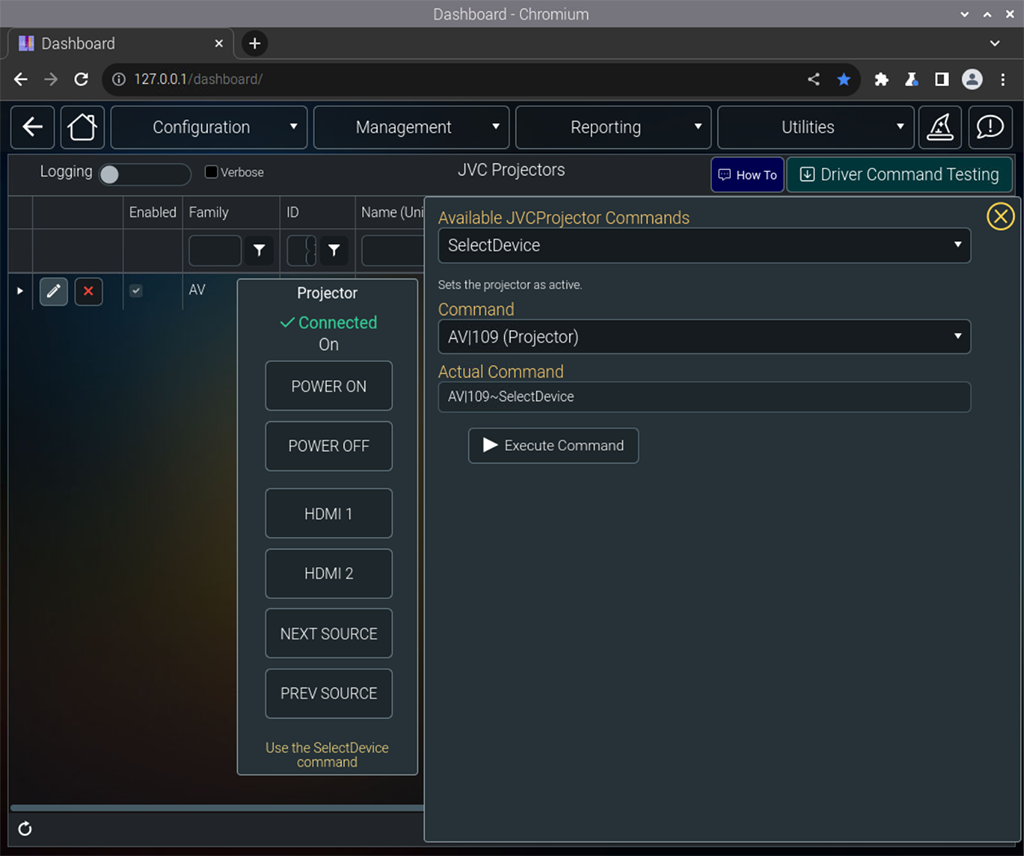
The driver has been updated and it will now track power state. It will also support sending a password if the projector requires it. The AddProjector command now supports an optional password parameter. If you projector does not need a password leave it blank.
Finally the command builder overlay exposes a side panel so that you can directly test command and control of the projector.
Last edit: 2 years 6 months ago by davep.
The following user(s) said Thank You: bowlingbeeg, Fattykidd
Please Log in or Create an account to join the conversation.
Time to create page: 0.292 seconds

Copyright © 2026 Allonis. All Rights Reserved.