

Client Support
How to issue curl commands within myServer for automation?


How to issue curl commands within myServer for automation?
7 months 2 weeks ago
Hey guys I have a Tetratune video processor in my home theater and up to this point I've been controlling this through it's built in web server but I would very much like to enable some automation through myServer. It's a niche device that's only been available for a few months so there's obviously no native driver available in myServer, but today Videworks (the manufacturer) has implemented a public API for automation along with the necessary documentation. It uses Curl for this.
For example I'd like to be able to be able to enable/disable the video processor on the fly from my remote. The commands to do so are:
curl -X POST 192.168.1.xxx/colour_tuner/enable/true -d '{}'
curl -X POST 192.168.1.xxx/colour_tuner/enable/false -d '{}
I know absolutely nothing about curl, but from what I gather myServer has the capability of issuing these types of commands. Can anyone tell me how I would add this to a myServer macro? I assume there is some additional syntax that is required beyond me just pasting these exact lines into my command sequences.
Since I don't know what I don't know if I'm not providing enough info here I can certainly provide the API documentation if it would be helpful. Any insight would be greatly appreciated. Thanks in advance!
For example I'd like to be able to be able to enable/disable the video processor on the fly from my remote. The commands to do so are:
curl -X POST 192.168.1.xxx/colour_tuner/enable/true -d '{}'
curl -X POST 192.168.1.xxx/colour_tuner/enable/false -d '{}
I know absolutely nothing about curl, but from what I gather myServer has the capability of issuing these types of commands. Can anyone tell me how I would add this to a myServer macro? I assume there is some additional syntax that is required beyond me just pasting these exact lines into my command sequences.
Since I don't know what I don't know if I'm not providing enough info here I can certainly provide the API documentation if it would be helpful. Any insight would be greatly appreciated. Thanks in advance!
Please Log in or Create an account to join the conversation.
Re: How to issue curl commands within myServer for automation?
7 months 2 weeks ago - 7 months 2 weeks ago
You would use PostURL. Something like:
Code:
PostURL|http://192.168.1.xxx/colour_tuner/enable/true~{}
Last edit: 7 months 2 weeks ago by andrew.
The following user(s) said Thank You: Nillaz
Please Log in or Create an account to join the conversation.
Re: How to issue curl commands within myServer for automation?
7 months 2 weeks ago
Just to elaborate, I created a Macro using that Allonis statement with Macro replacement parameters specified.
For example (using a "Get" HTTP statement instead of a "Post"):
Macro hs_run_event (which initiates a Homeseer event):
GetUrl|http://192.168.0.80/JSON?request=runevent&groupname=&name=
And when I want to invoke it:
hs_run_event|TheGroupName~TheEventName
-- the reulting http command that is actually sent to Homeseer is:
http://192.168.0.80/JSON?request=runevent&groupname=TheGroupName&name=TheEventName
For example (using a "Get" HTTP statement instead of a "Post"):
Macro hs_run_event (which initiates a Homeseer event):
GetUrl|http://192.168.0.80/JSON?request=runevent&groupname=
And when I want to invoke it:
hs_run_event|TheGroupName~TheEventName
-- the reulting http command that is actually sent to Homeseer is:
http://192.168.0.80/JSON?request=runevent&groupname=TheGroupName&name=TheEventName
The following user(s) said Thank You: Nillaz
Please Log in or Create an account to join the conversation.
Re: How to issue curl commands within myServer for automation?
7 months 2 weeks agoI think the editor/forum software ate your p1 and p2 parameter tags.Just to elaborate, I created a Macro using that Allonis statement with Macro replacement parameters specified.
For example (using a "Get" HTTP statement instead of a "Post"):
Macro hs_run_event (which initiates a Homeseer event):
GetUrl|http://192.168.0.80/JSON?request=runevent&groupname=&name=
And when I want to invoke it:
hs_run_event|TheGroupName~TheEventName
-- the reulting http command that is actually sent to Homeseer is:
http://192.168.0.80/JSON?request=runevent&groupname=TheGroupName&name=TheEventName
Code:
GetUrl|http://192.168.0.80/JSON?request=runevent&groupname=<p1>&name=<p2>
Please Log in or Create an account to join the conversation.
Re: How to issue curl commands within myServer for automation?
7 months 2 weeks ago
Just tested and POSTURL let's me manually enable/disable the various toggles in the VP and switch between different 3D LUT slots. This is WAY better than having to juggle between the remote and a web browser on my phone.
Now I need to figure out how to query the VP for the attributes of whatever content is currently playing and add them as variables in myServer. I suspect this is going to be a bit more complicated lol
Thanks for putting me on the right path you guys are awesome!
Now I need to figure out how to query the VP for the attributes of whatever content is currently playing and add them as variables in myServer. I suspect this is going to be a bit more complicated lol
Thanks for putting me on the right path you guys are awesome!
Please Log in or Create an account to join the conversation.
Re: How to issue curl commands within myServer for automation?
7 months 2 weeks ago
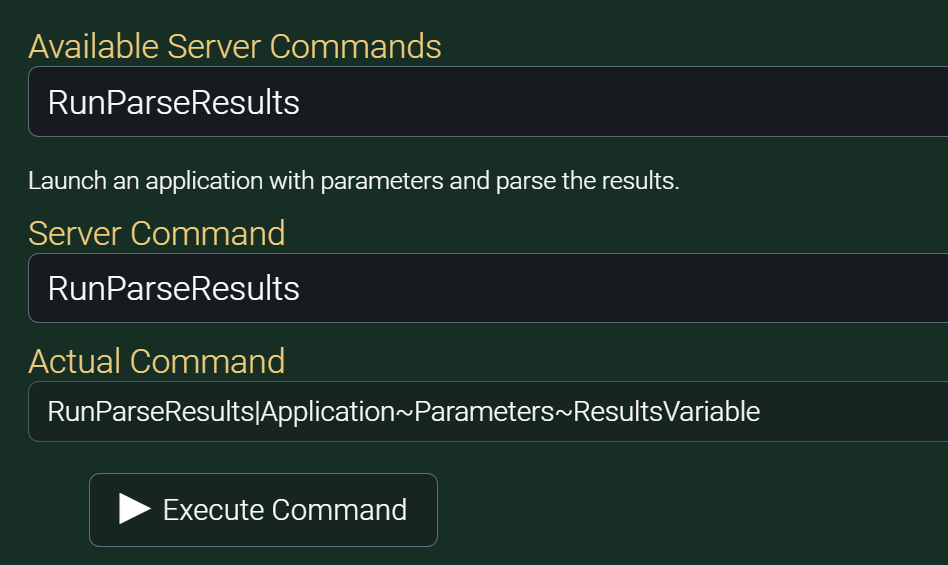
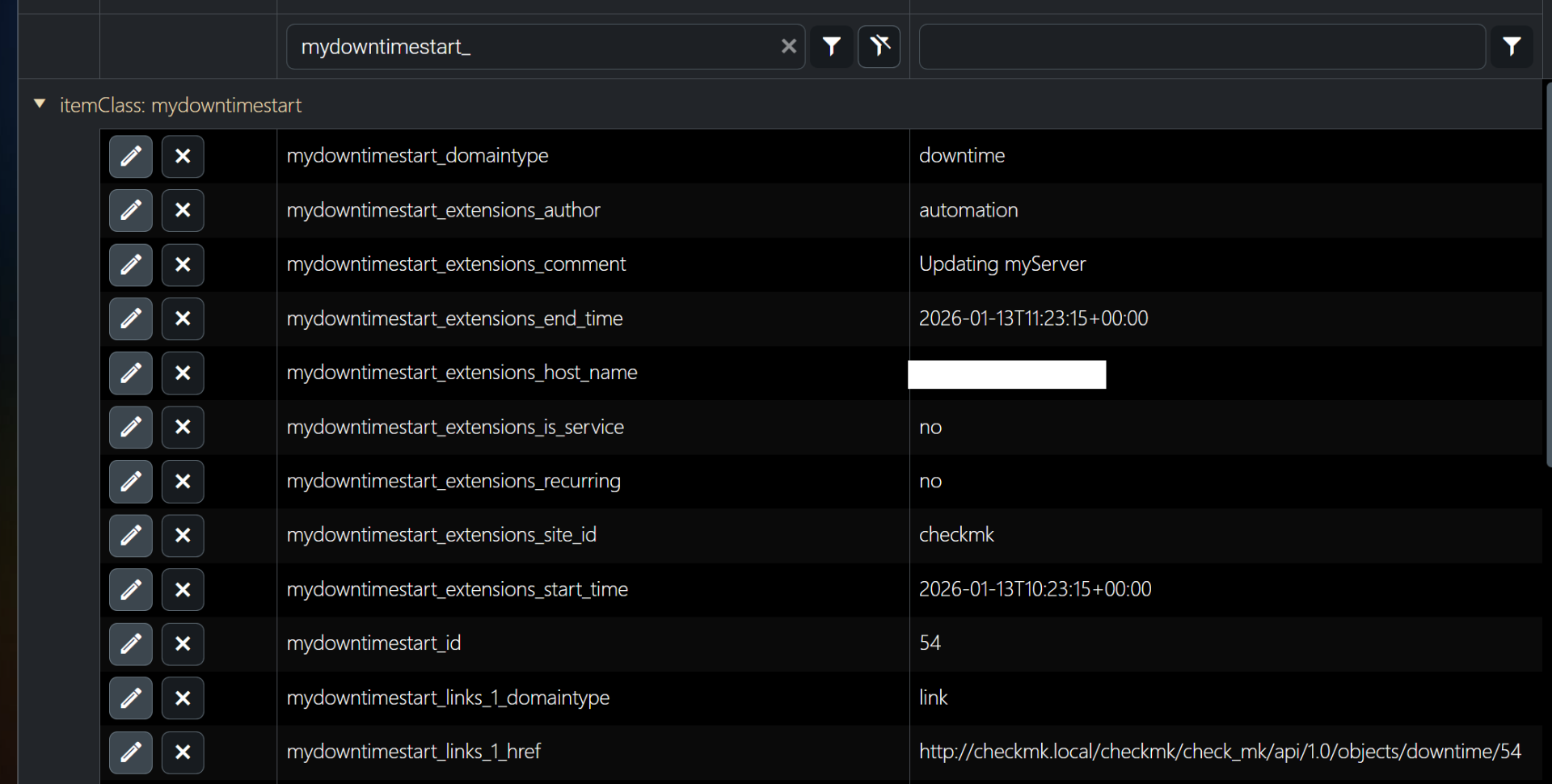
I use RunParseResults to run a local shell script on the server and parse the returned JSON output into myServer variables.
Code:
RunParseResults|/home/allonis/scripts/startdowntime.sh~~mydowntimestart!
The following user(s) said Thank You: Nillaz
Please Log in or Create an account to join the conversation.
Time to create page: 0.302 seconds

Copyright © 2026 Allonis. All Rights Reserved.