

Client Support
Moonlight Template and Modbus lighting control
 Topic Author

Moonlight Template and Modbus lighting control
2 years 9 months ago
It seems like the Moonlight template is crashing. I go to the lighting screen and click the list view. That brings up all of my rooms. Then I click on a room such as the Basement Amp Shop where my desk is located and I can click the on/off buttons a couple times and then it freezes and won't respond until I reload the Moonlight website. This happens with any room I try.And after a few clicks to navigate around the Moonlight site, some of the icons disappear This happens with any room I try.
Help!
Thanks.
-Graydon
Help!
Thanks.
-Graydon
Please Log in or Create an account to join the conversation.


Re: Moonlight Template and Modbus lighting control
2 years 9 months ago
You will need to configure the room macro. I am travelling so cant point you there easily.
Please Log in or Create an account to join the conversation.
Topic Author
Re: Moonlight Template and Modbus lighting control
2 years 9 months ago
OK I went through the Rooms configurator under "Configuration" in Dashboard and I think the Rooms here reflect what I have in the init.house-lighting macro. The first time I tried it after this I got about ten light switch events so being rather encouraged, I started wandering around the house with my ipad and after a few more switches in other rooms, it froze again in the Kitchen. I noticed it froze on a circuit that has a different icon in Moonlight that looks like a little flame. All of the other circuits have an icon that looks like a switch wall plate.
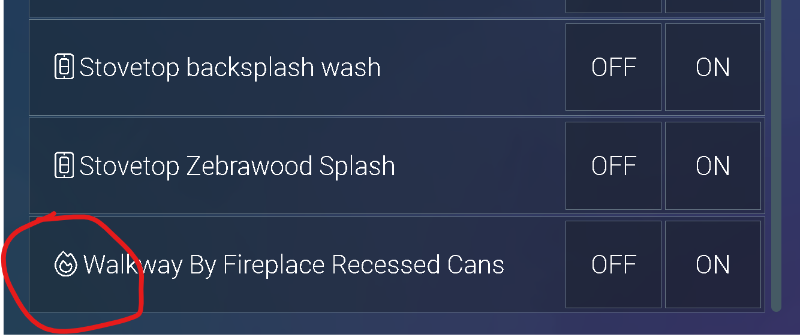
I don't think that is the problem though because I have three different devices running Moonlight (iPhone, iPad, PC) Even after the iPad crashed, I was able to use the iPhone to switch one circuit once. Then it froze. Then I tried the PC and it also switched one circuit once before freezing. It almost seems like there is some communication protocol that is stopping communications.
I don't think that is the problem though because I have three different devices running Moonlight (iPhone, iPad, PC) Even after the iPad crashed, I was able to use the iPhone to switch one circuit once. Then it froze. Then I tried the PC and it also switched one circuit once before freezing. It almost seems like there is some communication protocol that is stopping communications.
Please Log in or Create an account to join the conversation.
Topic Author
Re: Moonlight Template and Modbus lighting control
2 years 9 months ago
Another thing I have noticed... often Moonlight responds instantly but also just as often it takes 3-5 seconds to respond to a button press. Is this an issue in Moonlight or is there a bug in the driver?
Thanks,
Thanks,
Please Log in or Create an account to join the conversation.
Topic Author
Re: Moonlight Template and Modbus lighting control
2 years 8 months ago - 2 years 8 months ago
I'm making progress here...I figured out one question… When I clicked on the basement kitchen it came up with a blank list and the title at the top of the blank list was “Basementkitchen” with no space between the two words. I typically don’t name my rooms that way so I looked in the button in the lighting-lower-overlay.html and sure enough, the room name had no space in the command. So I added the space and saved it. Now it pulls up the complete list of light circuits in the basement kitchen. So it seems those room names must be correct. It seems like Mydesigner doesn’t care too much about upper or lower case but I made them all agree with the room names in the init.house-lighting macro as well just in case.
Now I can switch on/off every light in the house and the app doesn’t crash but most times it takes 3 – 10 seconds before the switch will respond. Occasionally it will respond immediately. How do we fix that?
Also, I added a fireplace icon that comes on when the fireplace is on. I just copied that one from the original Moonlight. Eventually I will add indicator icons for all of the lights in the house.
Now I can switch on/off every light in the house and the app doesn’t crash but most times it takes 3 – 10 seconds before the switch will respond. Occasionally it will respond immediately. How do we fix that?
Also, I added a fireplace icon that comes on when the fireplace is on. I just copied that one from the original Moonlight. Eventually I will add indicator icons for all of the lights in the house.
Last edit: 2 years 8 months ago by graydon@gdsamps.com.
Please Log in or Create an account to join the conversation.
Re: Moonlight Template and Modbus lighting control
2 years 8 months ago
Hi Graydon,
For forum topic closure, we updated the custom Modbus driver for you. We believe that addressed the timing issues on your myServer 6 system. Let us know if you need further assistance. Thanx!
For forum topic closure, we updated the custom Modbus driver for you. We believe that addressed the timing issues on your myServer 6 system. Let us know if you need further assistance. Thanx!
Please Log in or Create an account to join the conversation.
Time to create page: 0.305 seconds

Copyright © 2026 Allonis. All Rights Reserved.