

Client Support
Short press no longer working


Re: Short press no longer working
1 year 8 months ago
I'll make sure I keep up on it.
Anywho my wife thanks you as well. Working on this also lit a fire under me to add a screenlock to the remotes as well. She's been asking for something like this for awhile now lol.
Anywho my wife thanks you as well. Working on this also lit a fire under me to add a screenlock to the remotes as well. She's been asking for something like this for awhile now lol.
Please Log in or Create an account to join the conversation.
Re: Short press no longer working
1 year 8 months ago
By screenlock do you mean you pick up the remote, the screen turns on so you can use the hard buttons but there's some kind of blocking overlay on the screen that stops you accidentally activating touch buttons? And you have to swipe or something to get rid of the overlay? If so I've been contemplating doing exactly the same thing as my wife has small hands and she often touches the touchscreen accidentally.
Please Log in or Create an account to join the conversation.
Re: Short press no longer working
1 year 8 months ago
It's an overlay that blocks the screen. She often lays the remote next to her and apparently my dogs have a habit of accidentally triggering actions when they jump up on the couch or the bed lol.
I tied it to a function button on the remote. I haven't yet figured out a way to make the remote recognize a swipe gesture.as a command to disable it.
I tied it to a function button on the remote. I haven't yet figured out a way to make the remote recognize a swipe gesture.as a command to disable it.
Please Log in or Create an account to join the conversation.
Re: Short press no longer working
1 year 8 months ago
Thanks - I mentioned swipe as that's what Harmony has but yeah, I can't think of a way of doing that on the SmartRemote either. Do you trigger it after a time delay or is it a user action to engage it?
Please Log in or Create an account to join the conversation.
Re: Short press no longer working
1 year 8 months ago - 1 year 8 months agoI had been using the F3 short press as a way to toggle it on and off but after thinking about it more in depth today I've come up with a solution for a "poor man's" swipe gesture. I just tested and it works well. I think I'm also gonna automate it so the screenlock engages automatically when the remote wakes up if a scene is already activated but I haven't gotten there yet.Thanks - I mentioned swipe as that's what Harmony has but yeah, I can't think of a way of doing that on the SmartRemote either. Do you trigger it after a time delay or is it a user action to engage it?
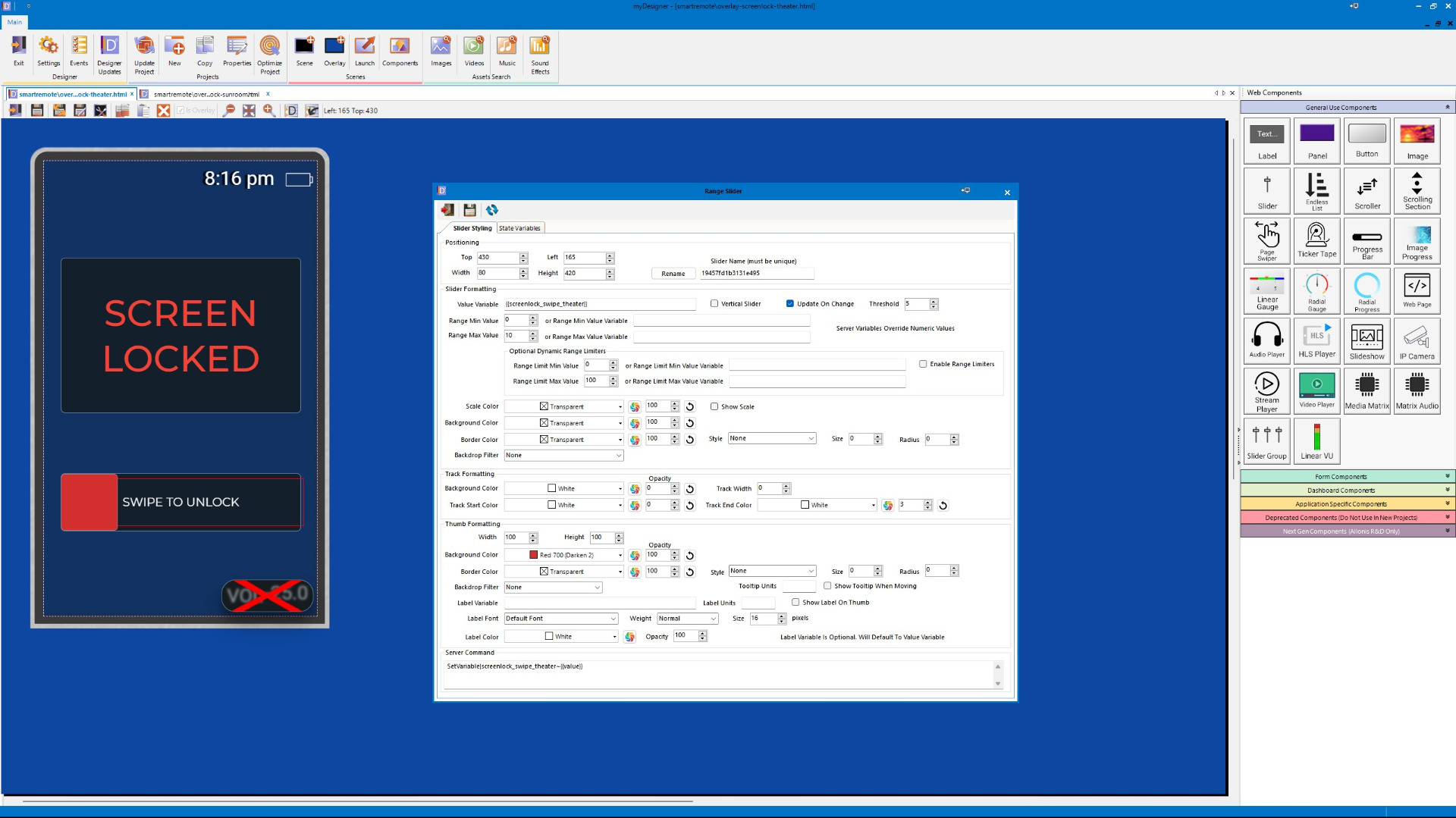
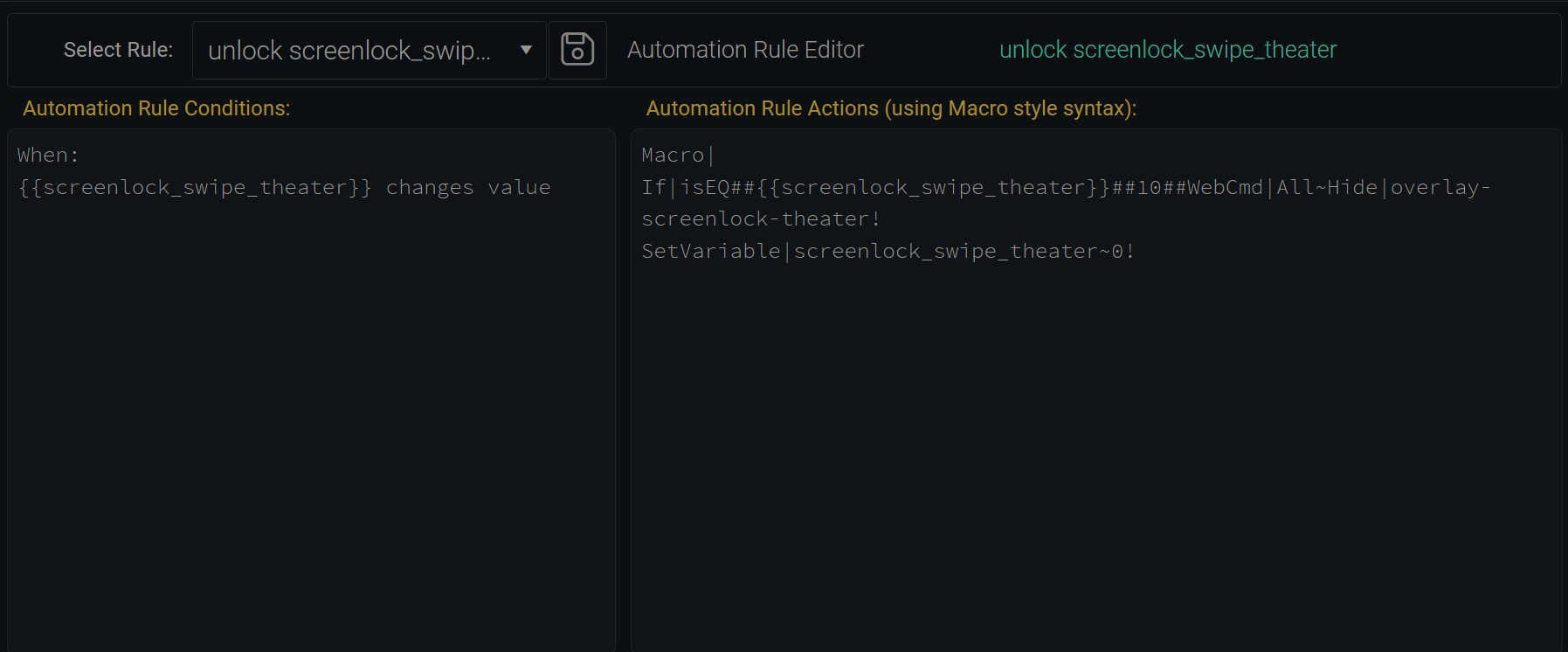
If you want to create a swipe gesture it turned out to be easier than I thought it was going to be. Previously I had been way overthinking it. Below is how to make it happen. I know you don't need the extreme level of detail but I'm including it (with screenshots) for the benefit of others who might want something similar. Ignore the other screen elements on the overlay. I added a few things I still want visible even when the overlay is switched on.
Create a new numeric variable to track the screenlock. Then create a new slider on the screenlock overlay and set it to the new variable. Set the server command associated with the slider to update the value of the variable as well. Set the Range Max of the slider to something reasonable (I chose 10). Adjust the graphical parameters of the slider to your preferences. I chose to hide the slider track, got rid of the tooltip, and enlarged the slider button (100) so it's more finger friendly than the default size (60) but YMMV. I also overlaid the slider itself over a button labelled "swipe to unlock" just to make it's purpose blatantly obvious.
Create a new automation. Set it to trigger when the screenlock variable changes. For the automation action create a conditional where it hides your overlay when the screenlock variable equals it's max value, then have the macro set the variable back to zero. The screenlock disengages upon the swipe and Bob's your uncle!
Hope it helps!
Last edit: 1 year 8 months ago by Nillaz.
Please Log in or Create an account to join the conversation.


Re: Short press no longer working
1 year 8 months ago
The ability to swipe to run a command will be added to myDesigner when we can get to it. Similar to how hard buttons are defined.
Please Log in or Create an account to join the conversation.
Time to create page: 0.471 seconds

Copyright © 2026 Allonis. All Rights Reserved.