

Client Support
Connecting the dots (inputs, volume, etc)

Connecting the dots (inputs, volume, etc)
2 years 7 months ago
Alright, so I've finally got just about everything in place to get my livingroom setup functional. I have my TV setup in the driver, my roku setup, and I configured a Generic Serial model for my soundbar and confirmed it works via the test commands. So now the question is, how do I connect all the dots. Let's start with an easy example, Volume Up.
In the Generic Serial driver the command I use to command volume up is: "AV|9~Send~PWSoundbar~Volume Up"
In myDesigner the command associated with the volume button is: "{{zone_volume_command_{{clientname}}}}~Up"
In myServer variables, I have the following variables
zone_volume_command_livingroom-fx-posm : AV|1~Up
livingroom_avamp_id : 3
livingroom_display_id : 1
That's kind of where the trail ends for me on connecting things. First I'm guessing I need to rename my Volume Up command to just "Up". But where does livingroom_display_id and livingroom_amp_id come from? Do I have to set those manually in the server variables? Or is there some config file?
Once I get it understanding to use the soundbar (effectively my AVR), how do I tell it which input is which source?
In the Generic Serial driver the command I use to command volume up is: "AV|9~Send~PWSoundbar~Volume Up"
In myDesigner the command associated with the volume button is: "{{zone_volume_command_{{clientname}}}}~Up"
In myServer variables, I have the following variables
zone_volume_command_livingroom-fx-posm : AV|1~Up
livingroom_avamp_id : 3
livingroom_display_id : 1
That's kind of where the trail ends for me on connecting things. First I'm guessing I need to rename my Volume Up command to just "Up". But where does livingroom_display_id and livingroom_amp_id come from? Do I have to set those manually in the server variables? Or is there some config file?
Once I get it understanding to use the soundbar (effectively my AVR), how do I tell it which input is which source?
Please Log in or Create an account to join the conversation.

Re: Connecting the dots (inputs, volume, etc)
2 years 7 months ago
From the designer modify the SmartRemote's project properties. The Properties button on the Projects menu.
Change the global hard button definitions from this
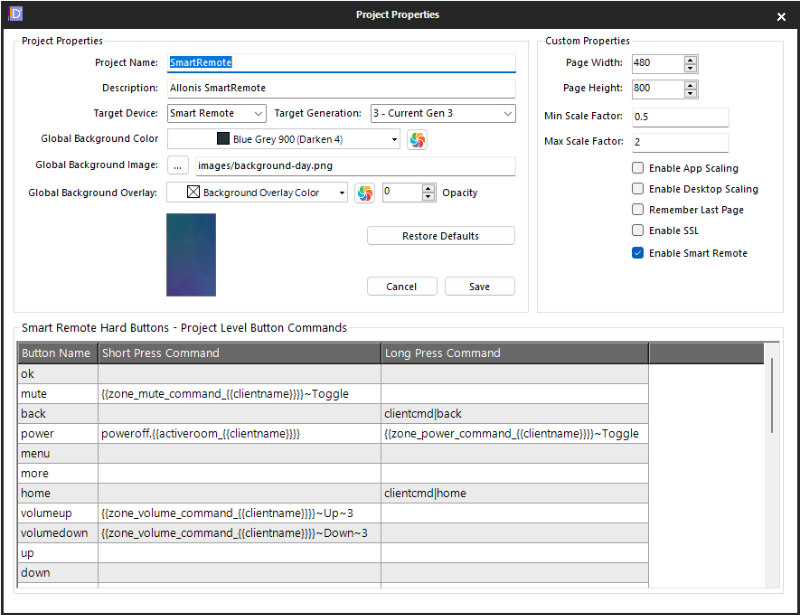
to this
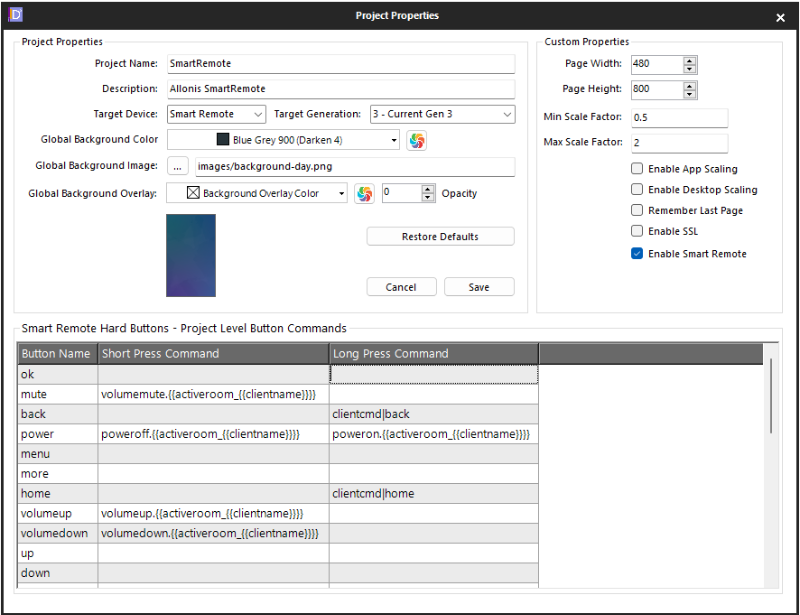
This will tie the default volume, mute and power buttons to the macros that have been created for each room.
Save these changes.
Then go into the individual macros for the rooms and make the edits so they perform the appropriate actions for your room.
Volumeup.LivingRoom macro would become AV|9~Send~PWSoundbar~Volume Up
and so on.
These changes are in the current SmartRemote-Sample as they will be the default going forward.
Change the global hard button definitions from this
to this
This will tie the default volume, mute and power buttons to the macros that have been created for each room.
Save these changes.
Then go into the individual macros for the rooms and make the edits so they perform the appropriate actions for your room.
Volumeup.LivingRoom macro would become AV|9~Send~PWSoundbar~Volume Up
and so on.
These changes are in the current SmartRemote-Sample as they will be the default going forward.
Please Log in or Create an account to join the conversation.
Re: Connecting the dots (inputs, volume, etc)
2 years 7 months ago
Awesome, that works! Thanks.
Please Log in or Create an account to join the conversation.

Re: Connecting the dots (inputs, volume, etc)
2 years 7 months ago
Wait, you got the Generic Serial driver to send IP commands? Can you post some screen shots of how you did it?
Please Log in or Create an account to join the conversation.
Re: Connecting the dots (inputs, volume, etc)
2 years 7 months ago - 2 years 7 months ago
I replied in the other thread, but for some reason I can't figure out how to attach pictures.
Weird, now it worked, maybe it's a minimum number of posts thing.
Weird, now it worked, maybe it's a minimum number of posts thing.
Last edit: 2 years 7 months ago by stanger89.
Please Log in or Create an account to join the conversation.
Re: Connecting the dots (inputs, volume, etc)
2 years 7 months agoIs it wise to have poweroff default to a short press? I can envision someone accidentally pressing this button on the remote and killing movie night dead just when it's getting to the best part!From the designer modify the SmartRemote's project properties. The Properties button on the Projects menu.
Change the global hard button definitions from this
to this
This will tie the default volume, mute and power buttons to the macros that have been created for each room.
Save these changes.
Then go into the individual macros for the rooms and make the edits so they perform the appropriate actions for your room.
Volumeup.LivingRoom macro would become AV|9~Send~PWSoundbar~Volume Up
and so on.
These changes are in the current SmartRemote-Sample as they will be the default going forward.
Please Log in or Create an account to join the conversation.
Time to create page: 0.291 seconds

Copyright © 2026 Allonis. All Rights Reserved.