Allonis Allonis
  • Products
    • Sports Bar Systems
      • System Overview
      • System Demo
      • Installations
      • Sports Bar Info
        • Project Process
        • Competition
    • Customer Listening
      • Listening Overview
      • Listening Demo
    • Home Control
      • Control Overview
      • Control Demo
    • Product Type
      • Controllers
        • TVBox Controller
          • TVBox Getting Started
          • TVBox - Overview
      • Digital Signage
        • Signage Overview
        • Signage Demo
        • TableTopper
        • Overview
      • User Interfaces
        • SmartRemote
          • Introduction
        • SmartScreen
      • Audio
        • Audio Integration
        • Audio Streamer
      • Video
        • Video Integration
        • Mosaic Video Wall
      • RV / Marine
        • Shelly Relays - RV Slide Control
    • Supported Hardware
  • Shop
  • Support
    • Documentation
    • Get Help
      • Warranty
    • Forum
    • Downloads
      • Software
    • Dealers
    • About
  • Login
    • Order Form
    • myVehicle
    • Documentation - Mosets Tree
    • Documentation test
    • User Check Module
    • JoomCRM
Client Support
248-918-0123
Contact Us

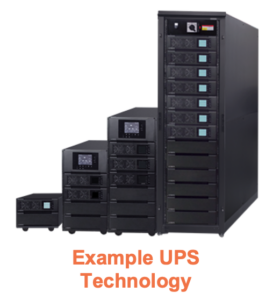
Most all storage media will not survive power cycle events across time.  It is very important for a myServer 6 control system to be on a UPS for proper graceful shutdown when there is an AC line power outage.  Read More.  Plugging the system into a UPS is a great first step.  But what if the power outage extends beyond the physical storage capacity of the backup battery?  It is important to automate a myServer graceful shutdown on all systems.  myServer can also be configured to shut down other devices (TVs, AV receivers, video matrix, etc.)  This ability greatly reduces the potential for very expensive equipment failures.

Note that Power cycle failures are not covered under Allonis's myServer controller warranty.

This is implemented with a compatible UPS that is USB connected to myServer for monitoring.  Note that USB has a limited cable length, so pre-planning the UPS and myServer location is important (should be within approx. 10 ft from each other).

This driver requires that the NUT utilities are installed on the server that is connected to the UPS controller. Please follow the Nut tutorial here.  Perform all the steps up to the "reboot (because it’s easy)" line.

Compatible with all APC Uninterruptible Power Backups that supports UPSD technology.

UPS is connected to myServer PIs USB.

You can also run the APC UPSD software on Windows and relay the message to myServer 6 controller via ethernet.

Uses APC UPSD

Power outage.

UPS goes on battery.

UPS starting to run out of battery.

UPS script 

UPS sends message to myServer via curl command (HTTP push message) to tell myServer to shutdown gracefully (save variables to database and shut process down)


Automation event example

Get the variable name from the list of variables for your UPS device ID (device ID is exposed in the UPS myServer Pi Driver)

Automation Rule Conditions:

When:

{{sensor_19_battery_charge}} <= 5

Automation Rule Actions:

Shutdown 

Use case:

Control systems like our myServer, can monitor the UPS (highly recommended in any installation). When the UPS battery goes low (power has been out for awhile), then myServer gracefully shuts down. But before it goes offline, it can be configured to send notifications that the UPS advises that the power is out. The network switch / modem etc. is also on a UPS (same one or different ones). And because myServer runs locally in the home with not critical need to see Internet, it can log the power outage, send local (to the home) messages to any connected client (like your phone) without Internet. It can also send an email / text message IF there is Internet. myServer monitors if Internet is available or not so it can be configured on what it's capable of doing.

Installation

Install the UPS driver from myServer Software Updater.  Click Discover.  Your USB connected UPS should then be found.  Select "sensor" as the Family type.  Network port is typically 3493.

Data should start to update in the "Sensor" catagory.  You can use these variables in your Automation Events and user interfaces.

Network UPS Tools (NUT) Ultimate Guide


By Techno Tim7

Meet NUT Server, or Network UPS Tools.It’s an open UPS networking monitoring tool that runs on many different operating systems and processors.This means you can run the server on Linux, MacOS, or BSD and run the client on Windows, MacOS, Linux, and more.It’ perfect for your Pi, server, or desktop.It works with hundreds of UPS devices, PDUs, and many other power management systems.

This is the ultimate guide to configuring Network UPS Tools (NUT).We cover everything from installing and configuring the server on as Raspberry Pi, configuring the client on Windows and Linux, configure a charting and graphing website to visualize NUT data, spin up an additional web site use Docker, and finally set up monitoring and alerting to automate shutdowns of your machine.

https://networkupstools.org


UT UPS Server

plug in ups

1
lsusb

should see something like

 
Bus 002 Device 001: ID 1d6b:0003 Linux Foundation 3.0 root hub
Bus 001 Device 019: ID 09ae:2012 Tripp Lite
Bus 001 Device 002: ID 2109:3431 VIA Labs, Inc. Hub
Bus 001 Device 001: ID 1d6b:0002 Linux Foundation 2.0 root hub
1
2
sudo apt update
sudo apt install nut nut-client nut-server
1
sudo nut-scanner -U

should see something like

tripp lite

1
2
3
4
5
6
7
8
[nutdev1]
        driver = "usbhid-ups"
        port = "auto"
        vendorid = "09AE"
        productid = "2012"
        product = "Tripp Lite UPS"
        vendor = "Tripp Lite"
        bus = "001"

apc 1500

1
2
3
4
5
6
7
8
9
[nutdev1]
        driver = "usbhid-ups"
        port = "auto"
        vendorid = "051D"
        productid = "0002"
        product = "Back-UPS XS 1500M FW:947.d10 .D USB FW:d10"
        serial = "3xxxxxxxxxxx"
        vendor = "Tripp Lite"
        bus = "001"

apc 850

1
2
3
4
5
6
7
8
9
[nutdev3]
        driver = "usbhid-ups"
        port = "auto"
        vendorid = "051D"
        productid = "0002"
        product = "Back-UPS ES 850G2 FW:931.a10.D USB FW:a"
        serial = "3xxxxxxxxxxx"
        vendor = "American Power Conversion"
        bus = "001"
1
sudo nano /etc/nut/ups.conf
1
2
3
4
5
6
7
8
9
10
11
12
13
14
15
16
17
18
19
20
21
22
23
24
25
pollinterval = 1
maxretry = 3

[tripplite]
    driver = usbhid-ups
    port = auto
    desc = "Tripp Lite 1500VA SmartUPS"
    vendorid = 09ae
    productid = 2012

[apc-network]
    driver = usbhid-ups
    port = auto
    desc = "APC Back-UPS XS 1500"
    vendorid = 051d
    productid = 0002
    serial = 3xxxxxxxxx

[apc-modem]
    driver = usbhid-ups
    port = auto
    desc = "APC 850 VA"
    vendorid = 051d
    productid = 0002
    serial = 3xxxxxxxxx
1
sudo nano /etc/nut/upsmon.conf
 
MONITOR tripplite@localhost 1 admin secret master
MONITOR apc-modem@localhost 1 admin secret master
MONITOR apc-network@localhost 1 admin secret master
1
sudo nano /etc/nut/upsd.conf

Change 127.0.0.1

 
LISTEN 127.0.0.1 3493 

to all interface

 
LISTEN 0.0.0.0 3493 
1
sudo nano /etc/nut/nut.conf
1
MODE=netserver
1
sudo nano /etc/nut/upsd.users
1
2
3
[monuser]
  password = secret
  admin master
1
sudo nano /etc/udev/rules.d/99-nut-ups.rules
1
2
3
4
5
6
7
SUBSYSTEM!="usb", GOTO="nut-usbups_rules_end"

# TrippLite
#  e.g. TrippLite SMART1500LCD - usbhid-ups
ACTION=="add|change", SUBSYSTEM=="usb|usb_device", SUBSYSTEMS=="usb|usb_device", ATTR{idVendor}=="09ae", ATTR{idProduct}=="2012", MODE="664", GROUP="nut", RUN+="/sbin/upsdrvctl stop; /sbin/upsdrvctl start"

LABEL="nut-usbups_rules_end"

reboot (because it’s easy)


UPS Battery FAQ

Uninterruptible power supply (UPS) batteries store energy and provide backup power when the main power source fails. The technology used in UPS batteries has evolved over time and today a variety of options exist depending on budget, environment, desired lifecycle and even safety requirements.

This article explores the pros and cons behind five major battery types: lead acid, lithium iron phosphate, sodium-ion, lithium-ion and nickel-cadmium. All are leveraged by modern UPS systems; however, newer technology (namely lithium iron phosphate and sodium-ion) are rapidly gaining popularity for their cost-to-performance balance, safety ratings and low environmental impact.

Lead Acid (SLA)

Lead acid batteries are one of the most commonly used constructions in UPSs. They are reliable, cost-effective, easy to manufacture and offer a relatively large storage capacity; however, they have a shorter lifespan, heavier weight and occupy a much larger footprint than other battery types. Lead acid UPSs are generally cheaper to purchase upfront, but their short life makes them a much costlier option overtime — especially when used in larger whole-building and mission-critical systems.

Another drawback with lead acid batteries is their environmental impact. Lead is a toxic material that requires specialized handling and disposal, and lead acid batteries tend to recharge inefficiently causing them to draw more power than other UPS options.

  • Typical Battery Life: 2 – 3 years
  • Upfront Cost: Low
  • Long-Term Cost: High
  • Maintenance: High
  • Maximum Operating Temperature:  32 – 104 degrees F
  • Environmental Impact: Medium


Lithium iron phosphate batteries are rapidly gaining popularity with UPS manufacturers due to their long life, low maintenance and ecological benefits. Not to be confused with lithium-ion which we’ll discuss later, lithium iron phosphate technology is also safe and stable even in warm conditions. In fact, they tend to outperform most other battery formats — including lead acid — in high temperature environments.

Lithium iron phosphate batteries have a 3x greater average lifespan (8 – 10 years) than traditional lead acid technology with very little maintenance required. Additionally, they are non-toxic and don’t contain cobalt, a metal with environmental and ethical issues.

The downside to lithium iron phosphate is it’s upfront cost, and UPSs built with lithium iron phosphate batteries tend to have a higher initial cost but a lower overall cost considering their long life, low maintenance need and highly efficient performance.

  • Typical Battery Life: 8 – 10 years
  • Upfront Cost: High
  • Long-Term Cost: Low
  • Maintenance: Low
  • Maximum Operating Temperature:  32 – 113 degrees F
  • Environmental Impact: Medium

Sodium-Ion (Na-Ion / SIB)

Sodium-ion battery technology has seen a resurgence in recent years due to it’s low cost, wide temperature operating range, reliability and low ecological footprint. As their name implies, sodium-ion batteries use sodium ions to store and maintain an electric charge. Sodium, an abundant and low cost mineral, performs extremely well over long periods of time and in extreme conditions, and sodium-ion batteries are typically rated for 10 – 15 years in temperatures up to 140 degrees F.

The downside to sodium-ion technology is its low energy density, resulting in larger and heavier UPSs.

  • Typical Battery Life: 10 – 15 years
  • Upfront Cost: Low
  • Long-Term Cost: Low
  • Maintenance: Low
  • Maximum Operating Temperature:  -4 – 140 degrees F
  • Environmental Impact: Low

Lithium-Ion (Li-Ion)

Not to be confused with lithium iron phosphate which we discussed above, lithium-ion technology is being phased out of UPS use due to thermal concerns. As noted with consumer electronics, lithium-ion batteries can overheat uncontrollably, releasing gas and potentially causing a fire or explosion when damaged or operated in a hot environment.

That said, lithium-ion technology is still used due to its moderate cost and longer lifespan; however, regular inspection is recommended.

  • Typical Battery Life: 8 – 10 years
  • Upfront Cost: Medium
  • Long-Term Cost: Medium
  • Maintenance: Low
  • Maximum Operating Temperature:  32 – 104 degrees F
  • Environmental Impact: Medium

Nickel-Cadmium (NiCd)

Nickel-cadmium batteries have largely been phased out of UPS use due to their high overall cost and negative environmental impact. Though they have a long lifespan (15 – 20 years), nickel-cadmium batteries tend cost more than other battery constructions due to required maintenance and difficulties with manufacturing.

Additionally, nickel-cadmium batteries contain both nickel and cadmium — two highly toxic materials — making disposal difficult. Combine this with a large physical footprint and a tendency to loose charge even when not being cycled, and nickel-cadmium has rapidly lost favor with most UPS manufacturers.

  • Typical Battery Life: 15 – 20 years
  • Upfront Cost: Medium
  • Long-Term Cost: High
  • Maintenance: High
  • Maximum Operating Temperature:  -4 – 104 degrees F
  • Environmental Impact: High

Search

Products
myServer 63
1.5U Modular Case1
1.5U Modular Case
Applications4
Advanced Presets1
Advanced Presets
Circadian App1
Circadian App
Kiosks1
Kiosks
myAudioStreamer Application1
myAudioStreamer Application
myCapture62
myCapture
myCapture Audio Streamers
myDigitalSignage1
myDigitalSignage
myIO Adapter for myServer 6 Pi Controllers
myIrrigation
myPreview1
myPreview
TVListings1
TV Listings Application1
TV Guide Application
myTV Application
myVehicle1
myVehicle App
Roku TV
RV / Truck
RV-C Integration
RV Media Systems1
RV Media Systems
Tire Pressure Monitoring System1
Tire Pressure Monitoring System
Shelly Relays - RV Lighting1
Shelly Relays - RV Lighting
Shelly Relays - RV Slide Control1
Room Slide Controller Automation - RV
Sonos1
Sonos Driver Installation
Weather1
Weather
myIrrigation Application1
myIrrigation Application
myWines1
myWines
Plex App Installation1
Plex App Installation
Voice Commands - Siri1
Voice Commands - Siri
myServer 6 Task Scheduler1
myServer 6 Task Scheduler
myServer 6 Maintenance1
myServer 6 System Management Options
Digital Signage
myVehicle
myUI
Netflix
Templates1
Trade Show Template1
Trade Show Template
Home Automation Control System
myIR12 Controller
Audio Matrix System Comparison
Operating Systems
Sports Bar Control System Comparison
Featured Projects
RV fresh and waste water Auto Dump1
RV fresh and waste water Auto Dump
SurfGate Control
Utica Comets1
Utica Comets
WakeSurf Boat Automation1
WakeSurf Boat Automation
Case Study - IP Cameras displayed in MultiView TV1
Case Study - IP Cameras displayed in MultiView TV
Planning your System
Allonis Services1
Allonis Networking Service1
Allonis Networking Service
Allonis Installation Service1
myServer Installation
Floorplans1
Floorplans
System Readiness Checklist1
System Readiness Checklist
Managed Services
Product Kiosks1
Product Kiosks
Smart Mirror
SmartRemote1
SmartRemote
SmartScreen - On Wall Display1
SmartScreen Getting Started
SportsBar System Packages
Sports Bar Demo
Sports Bar System Overview1
Sports Bar System Overview
Purchasing a Video Matrix1
Purchasing a Video Matrix
Video Over IP Feature Comparison1
Video Over IP Feature Comparison
TVBox - Overview
Drivers
Amplifiers
Audio Matrix
AES67 Audio IP Networking Overview1
What is AES67?
Allen and Heath Audio Matrix Driver1
Allen and Heath Audio Matrix Driver
Atlas Atmosphere Audio Driver1
Atlas Atmosphere Audio Driver
AVPro ACMax24A Audio Matrix1
AVPro ACMax24A Audio Matrix
BSS-100 Driver1
BSS-100 Driver
DBX - Driver1
DBX - Driver
DBX640 - Driver1
DBX640 - Driver
MonoPrice Blackbird Driver1
MonoPrice Blackbird Driver
MRC88 Audio Matrix Driver1
MRC88 Audio Matrix Driver
QSC Audio Driver1
QSC Audio Driver
RTIADx Audio Driver1
RTIADx Audio Driver
Russound Rio Driver1
Russound Rio Driver
Russound RNET Audio Driver1
Russound RNET Audio Driver
Wiring: Connecting RCA audio jacks to Phoenix Connectors1
Wiring: Connecting audio jacks to Phoenix Connectors
DSP444 AES67 Audio over IP Driver1
DSP444 4x4x4 audio processor
DSP4428 AES67 Audio over IP Driver1
DSP4428 4x4x28 audio processor
AES67 Virtual Windows Sound Card1
AES67 Virtual Windows Sound Card
Audio Video Receivers
Anthem AVR Driver1
Anthem Driver
Denon Driver1
Denon Driver Installation
Integra AV Receiver Driver1
Integra AV Receiver Driver
Marantz AudioVideo Receiver Driver1
Marantz AudioVideo Receiver Driver
Onkyo AVR Driver1
Onkyo AV Receiver Driver
Blinds
Lutron Blinds1
Lutron Blinds
Somfy RS485 Blinds1
Somfy RS485 Blinds
Somfy Synergy UAI+ Blinds1
Somfy Synergy UAI+ Blinds
Somfy Z-Wave Blinds1
Somfy Z-Wave Blinds
TRO.Y Blinds Controller Driver1
Screen Innovations TRO.Y Blind Control Driver
Bond Bridge - Shades1
Bond Bridge
Camera
BlueIris Camera NVR1
BlueIris Camera NVR
Hikvision IP PTZ Camera Setup1
Hikvision IP PTZ Camera Setup
IP Camera Integration1
IP Camera PTZ Driver1
IP Camera PTZ Driver
iP Camera Integration
Lumens Camera Driver1
Lumens Camera Driver
Ubiquiti IP Camera Setup1
Ubiquiti Camera Setup
Samsung NVR Driver1
Samsung NVR Driver
Armcrest IP Cameras1
Armcrest IP Cameras
IPCamera Wyze Integration1
Wyze Camera Integration
Contact / Motion Sensor
Control Device
Harmony Hub Driver1
Harmony Hub Driver
MyQ Garage Door Opener1
MyQ Garage Door Opener
Tablet Power Solutions1
Tablet Power Solutions
Infrared Control1
Infrared Control
UPS Monitor Driver1
UPS Monitor Driver
UPS myServer Pi Driver1
UPS myServer PI Driver
VideoStorm irUSB1
VideoStorm irUSB
Elgato Stream Deck1
Elgato Stream Deck
Shotbox Driver1
ShotBox Driver
Ratgdo Garage Door Control1
Ratgdo Garage Door Control
myIR1 WiFi to Infrared1
myIR1 WiFi to Infrared
myAtom1
myAtom
Energy
AccuEnergy Driver1
AccuEnergy Driver
Fan
Bond Bridge - Fans
Intercom
Keypad
Lighting
DMX Lighting1
DMX Lighting
Lutron Caseta Driver1
Lutron Caseta Driver
Lutron Driver1
Lutron Driver
Phillips Hue Driver1
Phillips Hue Driver
Lighting Sim Driver1
Lighting Sim Driver
Powerline DMX Pool Lighting1
Powerline DMX Pool Light Control
Shelly Automation Device Driver1
Shelly Device Driver
Media Player
Android V2 Driver2
Android V2 Driver
AndroidTV Driver
AppleTV control1
AppleTV control
Blu100 Driver1
Blu100 Driver
BluRay Player IR Control1
BlueRay IR Driver Installation
Cable TV - IR1
CableTV Driver
DLNA Media Player Driver Installation1
DLNA Media Player Driver Installation
Emby Media Server Configuration1
Emby Media Server Configuration
eStream4K Device Using IR1
eStream4K Device Using IR
FireTV 4K Installation1
FireTV 4K Installation
HEOS Driver1
HEOS Driver
Kodi Application1
Kodi Application
Live Streamer Driver1
Live Streamer Driver
MediaMatrix Streaming Media Driver1
MediaMatrix Streaming Media Driver
MediaPlayer Audio Amp1
MediaPlayer Audio Amp
myAudioPlayer1
myAudioPlayer
myMediaPlayer1
myMediaPlayer
Oppo Blu-Ray Player Driver1
Oppo Blu-Ray Player Driver
Roku Player Control1
Roku Player Control
Streaming Media Hardware Comparison1
Streaming Media Hardware Comparison
Streaming Music for Commercial Implementations1
Streaming Music for Commercial Implementations
Sony X1000 BluRay Driver1
Sony X1000 BluRay Driver
Tivo Player Driver1
Tivo Player Driver
Sonos Driver1
Sonos Driver
Zidoo Media Players1
Zidoo Media Players
Xfinity IP Driver1
Xfinity IP Driver
MediaEngine App1
MediaEngine App
Media Service
TuneIn Application
Pool
Jandy Pools1
Jandy Pools
Projector
Optoma Projector Driver1
Optoma Projector Driver
PJLink Driver1
PJLink Driver
BenQ Projector Driver1
BenQ Projector Driver
Mitsubishi Projector Driver1
Mitsubishi Projector Driver
NEC Projector Driver1
NEC Projector Driver
Sony Projector
Vivitek Projector Driver1
Vivitek Projector Driver
JVC Projector Driver1
JVC Projector Driver
Sony VPL Projector Driver1
Sony VPL Projector
JVC LX-NZ30 Projector Driver1
JVC LX-NZ30 Projector Driver
Receiver
Relay
Digital Loggers1
Digital Loggers Relay Driver
Dingtian Relay Driver1
Dingtian Relay Driver
Electronic Salon GPIO Relay1
Electronic Salon GPIO Relay
iMatic Relay Driver1
iMatic Relay Driver
Satellite
DirecTV Driver1
DirecTV Driver
Dish Network Driver1
DISH Network Driver
Security System
DSC Security System Driver1
DSC Security System Driver
ELK Driver Installation and Use1
ELK Driver Installation and Use
Security Simulator Driver1
Security Simulator Driver
Honeywell Security1
Honeywell Security
Outdoor Grill Integration
Traeger Grill Integration
Green Mountain Grill Driver
Sensor
1-Wire Temperature Sensor1
1-Wire Temperature Sensor
GPS Receiver Driver1
GPS Receiver Driver
Water Tank Level Sensing1
Water Tank Level Sensing
Television / Monitor
Controlling TVs via CEC1
Controlling TVs via CEC
Generic TVIR2
Generic TVIR Driver
Infrared TV Control
HiSense TV Control1
HiSense TV Control
NoHassle TV Driver1
NoHassle TV Driver
Insignia TV Control1
Insignia TV Control
LG TV Driver1
LG TV Driver
LGWebOS Driver1
LG WebOS Driver
Samsung BET Driver1
Samsung BET Driver
Samsung Signage TV Driver1
Samsung Signage TV Driver
Samsung Tizen TV Driver1
Samsung Tizen TV Driver
Samsung TV Driver1
Samsung TV Driver
Sony TV Driver1
Sony TV Control
Sharp TV Driver1
Sharp TV Driver
Sunbrite TV Driver1
Sunbrite TV Driver
Viewsonic TV Driver1
Viewsonic TV Driver
PJLink Driver1
PJLink Driver
TCL TV Driver1
TCL TV Driver
Peerless TV Driver1
Peerless TV Driver
Vizio TV Driver1
Vizio TV Driver
Thermostat
Climate Simulator1
Climate Simulator Driver
EcoBee Thermostat1
EcoBee Thermostat
Venstar Thermostat Driver1
Venstar Thermostat Driver
Tuner
Video Matrix
Video Wall Control1
Video Wall Control
AVPro QuadView Driver1
AVPro QuadView Driver
AVPro Video Matrix2
AVPro MXNet Driver
AVPro Driver
ANeuVideo Driver1
ANeuVideo Driver
Brightlink Video Switcher1
Brightlink Video Switcher
Factor A8 Matrix Switch Driver1
Factor A8 Matrix Switch Driver
HDTV HDBaseT Driver1
HDTV HDBaseT Driver
HDTV Video over IP Driver1
HDTV Video over IP Driver
AVOIP 4K Driver1
AVOIP900 Video Over IP 4K Driver
HDMI 36x36 Video Matrix1
HDMI 36x36 Video Matrix
HDMI Matrix Basics1
HDMI Matrix Basics
HDTV HDBitT Driver1
HDTV HDBitT Driver
HDTV Quad Driver1
HDTV Quad Driver
Just Add Power Driver1
Just Add Power Driver
Knox Video Switcher Driver1
Knox Video Switcher Driver
MOiP Video Matrix Driver1
MOiP Video Matrix Driver
Shinybow Video Driver1
Shinybow Video Driver
JTech Video Over IP ZTIP3001
JTech / Zenty Video Over IP IP300 Driver
Connectivity Technologies
CAN Driver1
CAN Driver
Connecting Bluetooth Devices to a Windows PC1
Connecting Bluetooth Devices to a Windows PC
Controlling a Water Valve via Tasmota Relay1
Controlling a Water Valve via Tasmota Relay
DMX
DMX - PKNight Art-Net controller setup1
DMX - PKNight Art-Net controller setup
Art-Net DMX Driver1
DMX - ArtNet Driver
GenericGPIO Relay Driver1
GenericGPIO Relay Driver
Generic Modbus Driver1
Generic Modbus Driver
Generic Serial Driver1
Generic Serial Driver
GlobalCache Driver1
GlobalCache Driver
IFTTT Configuration1
IFTTT Configuration
Infrared Control2
GenericIR Driver
Controlling devices via Infrared
Matter1
Matter - Does it matter?
MQTT Use1
MQTT Use
OBD/VIC Driver1
OBD/VIC Driver
OLA Service Monitor1
OLA Service Monitor
Raspberry BLE Device Driver1
Raspberry BLE Device Driver
Relays - IP controlled1
Relays - IP controlled
Sainsmart IP Relay Driver1
Sainsmart IP Relay Driver
Serial to Net for Pi Installation1
Serial to Net for Pi Installation
Sonoff Devices1
Sonoff Devices
Tasmota1
Tasmota
UPB Lighting Driver1
UPB Lighting Driver
Waveshare GPIO Relay Driver1
Waveshare GPIO Relay Driver
Zigbee Driver1
Zigbee Driver
Z-Wave JSUI Driver1
Z-Wave JSUI Driver
ZWay Raz Driver1
ZWay Raz Driver Installation
ESP32 Projects
ESP32 Doorbell Camera
ESP32 - Rotary Encoder1
ESP32 - Rotary Encoder
Allonis L3 Managed Switch Driver1
Allonis L3 Managed Switch Driver
Atomic IP2IR Driver1
Atomic IP2IR Driver

 allonis logo 700

4078 Waterland Drive Metamora, MI 48455

248-918-0123

info@allonis.com

    Copyright © 2026 Allonis. All Rights Reserved.
    Allonis LLC