

Client Support
myDesigner display issue in Parallels


myDesigner display issue in Parallels
2 years 7 months ago
There is a display issue in Parallels Windows VM on a Mac. The icons at the top are cut off. Making the software unusable. I am unable to upload a picture, not sure if is due to being a newer user.
Please Log in or Create an account to join the conversation.
Re: myDesigner display issue in Parallels
2 years 7 months agoDoes it look like this?There is a display issue in Parallels Windows VM on a Mac. The icons at the top are cut off. Making the software unusable. I am unable to upload a picture, not sure if is due to being a newer user.
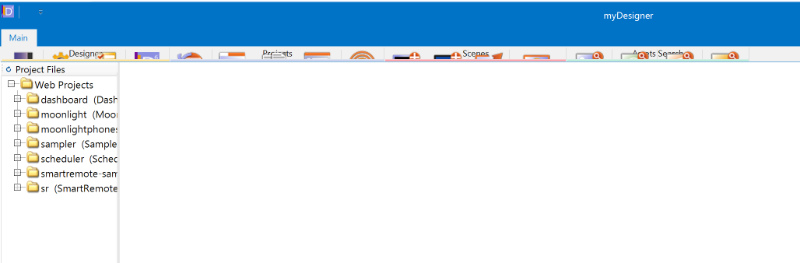
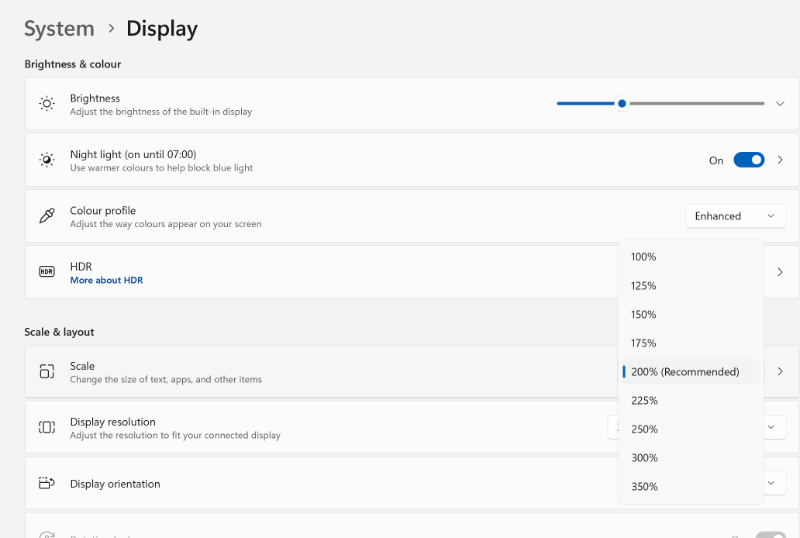
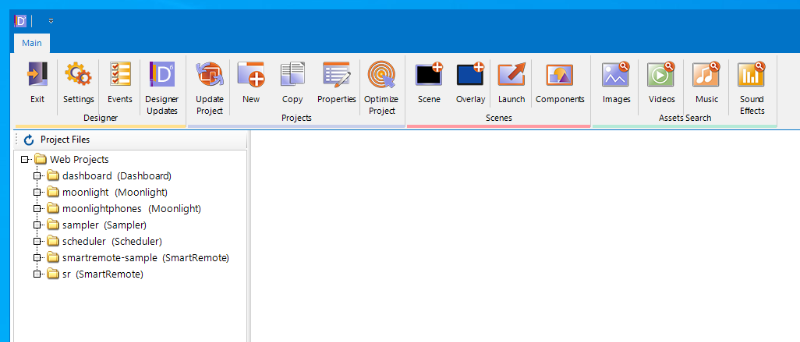
If so it might be you've got a high DPI screen and have scaling set. On my Surface Book it looks like this with display scaling set to 200%. If I change it to 100% it looks correct.
Andrew
Please Log in or Create an account to join the conversation.
Re: myDesigner display issue in Parallels
2 years 7 months ago
Thanks, that did end up working. When using Parallels you have to do it from the Parallels menu, not the Windows menu.
I'd still consider the issue as 'open'. Low resolution mode looks bad and should not be required.
I'd still consider the issue as 'open'. Low resolution mode looks bad and should not be required.
Please Log in or Create an account to join the conversation.


Re: myDesigner display issue in Parallels
2 years 7 months agoYes, the resolution change is the fix.Thanks, that did end up working. When using Parallels you have to do it from the Parallels menu, not the Windows menu.
I'd still consider the issue as 'open'. Low resolution mode looks bad and should not be required.
We are migrating myDesigner to working via web (no more Windows required). That's a lot of work and no promises on when it will be done.
Since many of the current issues have all been Windows related...can't wait...
Please Log in or Create an account to join the conversation.
Re: myDesigner display issue in Parallels
2 years 7 months ago
Hi billd, is your mac Intel or Apple Silicon (Mx series)?
Please Log in or Create an account to join the conversation.
Re: myDesigner display issue in Parallels
2 years 7 months ago
While on the topic of myDesigner running on Windows....what we learned today:
Microsoft has stopped shipping VC++ redistributable packages with Windows 11. It has now been added installing the VC++ as part of the designer install.
Hopefully that and file sharing properties will address folks that have had challenges getting myDesigner installed and connected to myServer.
Microsoft has stopped shipping VC++ redistributable packages with Windows 11. It has now been added installing the VC++ as part of the designer install.
Hopefully that and file sharing properties will address folks that have had challenges getting myDesigner installed and connected to myServer.
Please Log in or Create an account to join the conversation.
Time to create page: 0.447 seconds

Copyright © 2026 Allonis. All Rights Reserved.