

Client Support
Ecobee

Re: Ecobee
2 years 6 months agoI have searched the forum and couldn't find any other Ecobee threads- why I started this one. Again I have followed the documentation and it hasn't got me anywhere.Ensure the particular thermostat has been chosen as "active". I can't easily check on the template to see how that is chosen...usually a dropdown to pick from multiple thermostats.The first place I always check is the DOCUMENTATION because I know that is the answer for most all questions that are asked..."Did you follow the documentation??"allonis.com/support/documentation?view=category&id=348
did you follow that?
My recollection is you tell Ecobee.com where it is when you register it, and myServer just grabs that.
But you are bringing up that you should be able to switch it to a myServer managed room
For now, ensure the room spelling is same.
Ensure you are first searching the formal documentation, and then the forum if you answer isn't found in docs.
The site you referred to is the same page that pulls up if you click the How To button on the driver page. Its registered correctly, just not getting to My designer like it automatically should. The issue seems to be the .html page does not have any reference to the thermostat. For example, if I launch the remote, click on the lighting, and then hit F12, it shows code about each lighting source and which ID those control. The thermostat page doesnt display any of that but instead just the hard buttons. The picture is the exact F12 picture and is clear there is something left out when the page was written to get the info from the thermostat and sync up how it should.
"Go back to myServer ecobee driver.Run the GetDevices command. This will poll the Ecobee cloud with the 4 digit - 4 digit token and return all thermostats registered in the My Apps. myServer will then create the new thermostat device.You can test by running a thermostat command.The default Climate webpages should display your selected thermostat temp and the buttons should be able to change temperature set points."
Thats the last of the documentation- don't see anything about using a drop down box to select it as active like you stated. Basically says it should just "work" and should auto populate into the climate page. I can see needing to select an active one if you had multiple ones set up, but I just have one. So based on the DOCUMENTATION it should just "work".....But it doesn't. Is there a broken link between myserver 6 and MyDesigner?
One of the big reasons I purchased the Ecobee over another nest is to be able to control it while watching a movie...but so far thats a complete bust.
Please Log in or Create an account to join the conversation.


Re: Ecobee
2 years 6 months ago
If you look in the ecobee thermostat driver's Command Builder...you should see
Climate|1~SelectDevice
Select the thermostat you want to interact with.
Then Allonis's default user interfaces should display temps for that thermostat. And any actions (like set temp) should be specific to that thermostat.
If that doesn't work, post what's in the event log when you both do the SelectDevice command, and then the thermostat action.
Climate|1~SelectDevice
Select the thermostat you want to interact with.
Then Allonis's default user interfaces should display temps for that thermostat. And any actions (like set temp) should be specific to that thermostat.
If that doesn't work, post what's in the event log when you both do the SelectDevice command, and then the thermostat action.
Please Log in or Create an account to join the conversation.
Re: Ecobee
2 years 6 months agoThats correct- Like I said I have it linked in my server, but there is no evidence of it linking up in myDesigner. If you hit F12 in myDesigner, there is nothing like remotely looks like it has any ties into myserver.If you look in the ecobee thermostat driver's Command Builder...you should see
Climate|1~SelectDevice
Select the thermostat you want to interact with.
Then Allonis's default user interfaces should display temps for that thermostat. And any actions (like set temp) should be specific to that thermostat.
If that doesn't work, post what's in the event log when you both do the SelectDevice command, and then the thermostat action.
Please Log in or Create an account to join the conversation.
Re: Ecobee
2 years 6 months agoI am not understanding what you mean by "linking up in myDesigner". Is the issue that you can't edit webpages in myDesigner? Or something more specific with a climate.html type webpage? Send us your myDesigner PC's Teamviewer Host ID and password if you want us to see if there is any networking issue with myDesigner connecting to myServer.Thats correct- Like I said I have it linked in my server, but there is no evidence of it linking up in myDesigner. If you hit F12 in myDesigner, there is nothing like remotely looks like it has any ties into myserver.If you look in the ecobee thermostat driver's Command Builder...you should see
Climate|1~SelectDevice
Select the thermostat you want to interact with.
Then Allonis's default user interfaces should display temps for that thermostat. And any actions (like set temp) should be specific to that thermostat.
If that doesn't work, post what's in the event log when you both do the SelectDevice command, and then the thermostat action.
Please Log in or Create an account to join the conversation.

Re: Ecobee
2 years 6 months ago
I found that the testing UI in Dashboard seems to operate my Guytron Workshop thermostat. There is often a delay in response but the Ecobee seems to obey most commands. The Up and Down commands seem to work the best. They are almost instant.
However it does not obey the SetTemp command. I have tried all kinds of numbers and usually it grabs only the first digit.
For example, if I tell it to go to 75 deg with this command, Climate|5~SetTemp~75 it tryies to set the temp to 7 deg.but that setting does not seem to be successful on the Ecobee.
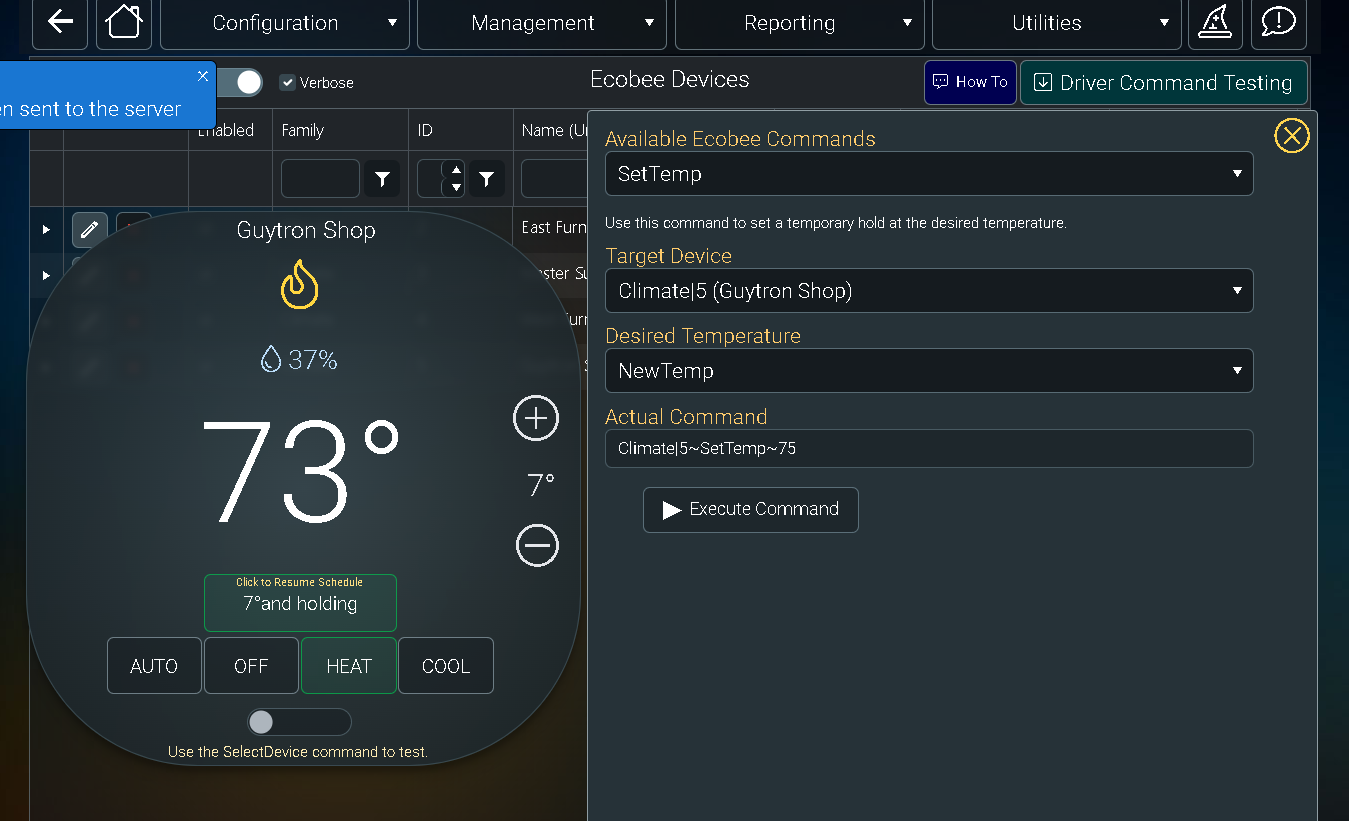
A few seconds later and it reverts to 45 deg
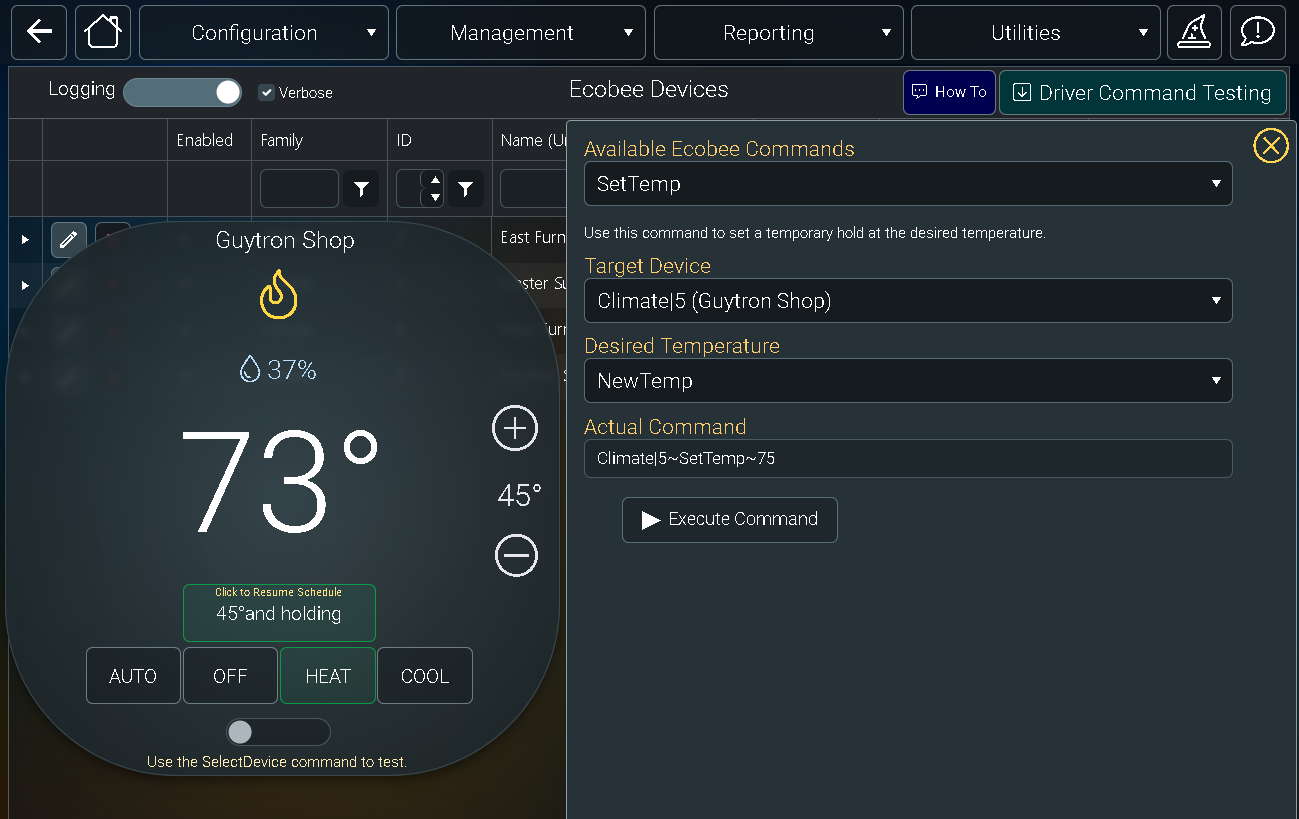
However it does not obey the SetTemp command. I have tried all kinds of numbers and usually it grabs only the first digit.
For example, if I tell it to go to 75 deg with this command, Climate|5~SetTemp~75 it tryies to set the temp to 7 deg.but that setting does not seem to be successful on the Ecobee.
A few seconds later and it reverts to 45 deg
Please Log in or Create an account to join the conversation.
Re: Ecobee
2 years 6 months ago - 2 years 6 months ago
And, if I try to change the temperature from Moonlight, it is completely unresponsive.
Last edit: 2 years 6 months ago by graydon@gdsamps.com.
Please Log in or Create an account to join the conversation.
Time to create page: 0.296 seconds

Copyright © 2026 Allonis. All Rights Reserved.