

Client Support
Hmmm how to add volume level indicator on remote screen?

Re: Hmmm how to add volume level indicator on remote screen?
2 years 7 months ago
Im pretty sure I already know the answer to this, but this only works if the AVR is controlled IP, correct? I was under the impression that the AVR I have, Yamaha RX-A6A, was going to be able to be controlled via IP but no drivers found for it yet. I have found the IR codes to control it, but being IR I know that no info is being sent back to my server, it is just receiving info from the IR blast.
Anyone have a Yamaha that they have been able to set up or find a driver that lets you control it with IP???
Anyone have a Yamaha that they have been able to set up or find a driver that lets you control it with IP???
Please Log in or Create an account to join the conversation.
Re: Hmmm how to add volume level indicator on remote screen?
2 years 7 months agoThis is correct.Im pretty sure I already know the answer to this, but this only works if the AVR is controlled IP, correct?
Please Log in or Create an account to join the conversation.

Re: Hmmm how to add volume level indicator on remote screen?
2 years 7 months ago
I figured out a way to display a popup with the volume and have it go away after 5 seconds, in case anyone else is interested here is what I did.
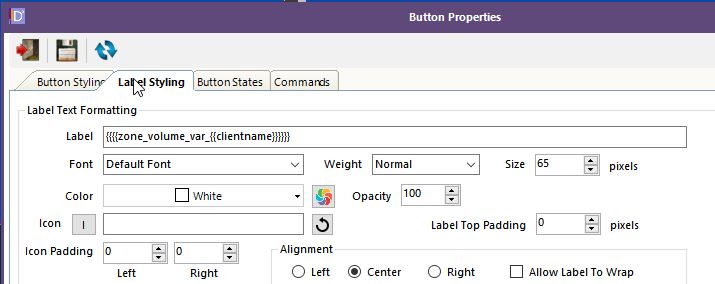
I first created an overlay with a button but you could just create a label/button on any scene that's hidden normally and only shows when the display_volume variable is set, the principle is the same.
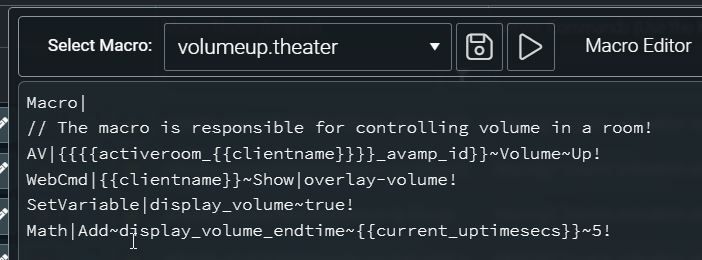
Then I added some commands to the volumeup/down macros that will show the overlay and set some new variables, display_volume and display_volume_endtime. The display_volume is set to true and display_volume_endtime is set to the current uptime in seconds plus how ever long you want the popup to stay up, in my case 5 seconds. Those values will be used in the automation that will be defined next.
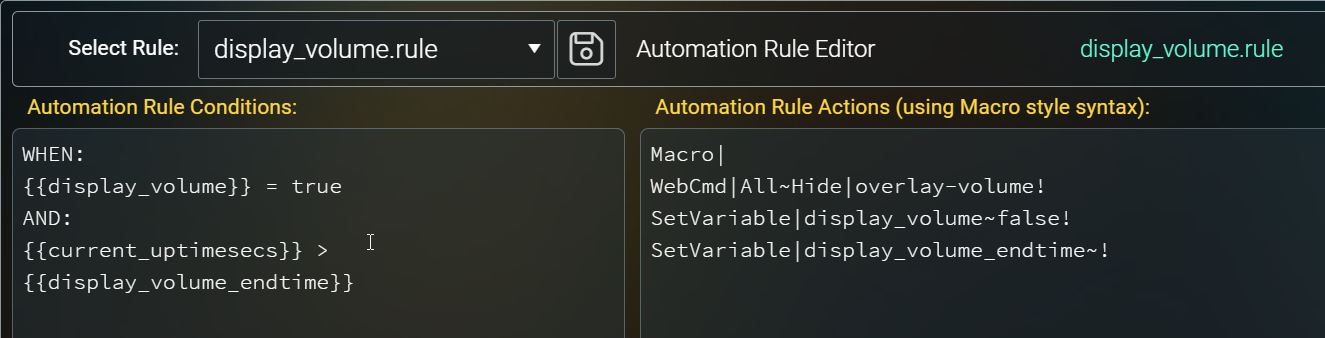
And finally I created an automation rule that looks for the display_volume to be set to true and the current uptime in seconds has passed the value we calculated in the macro. This will then trigger the automation rule which will hide the overlay, set display_volume to false, and clear the display_volume_endtime.
I first created an overlay with a button but you could just create a label/button on any scene that's hidden normally and only shows when the display_volume variable is set, the principle is the same.
Then I added some commands to the volumeup/down macros that will show the overlay and set some new variables, display_volume and display_volume_endtime. The display_volume is set to true and display_volume_endtime is set to the current uptime in seconds plus how ever long you want the popup to stay up, in my case 5 seconds. Those values will be used in the automation that will be defined next.
And finally I created an automation rule that looks for the display_volume to be set to true and the current uptime in seconds has passed the value we calculated in the macro. This will then trigger the automation rule which will hide the overlay, set display_volume to false, and clear the display_volume_endtime.
Please Log in or Create an account to join the conversation.
Re: Hmmm how to add volume level indicator on remote screen?
2 years 7 months ago
That's a great demo of how to do something - thanks! It's also given me an idea for how to improve my alpha keyboard input macros so there aren't pauses after key presses if it's not necessary.
Andrew
Andrew
Please Log in or Create an account to join the conversation.
Re: Hmmm how to add volume level indicator on remote screen?
2 years 7 months ago - 2 years 7 months agoSomehow I missed the Yamaha related part of your message before, sorry. See my post here - allonis.com/forum/av-family/136-ip-contr...77-av-amplifier#1031Im pretty sure I already know the answer to this, but this only works if the AVR is controlled IP, correct? I was under the impression that the AVR I have, Yamaha RX-A6A, was going to be able to be controlled via IP but no drivers found for it yet. I have found the IR codes to control it, but being IR I know that no info is being sent back to my server, it is just receiving info from the IR blast.
Anyone have a Yamaha that they have been able to set up or find a driver that lets you control it with IP???
That enables one way IP control but still doesn't get info back and nobody has answered my question about if it's possible to parse the returned info so I'm assuming the answer is no.
At the moment I'm thinking set a variable when you know you're turning on the amp and know what its initial volume is. Then use that variable to keep track of the volume on up and down changes. And hope they don't get out of sync.
Andrew
Last edit: 2 years 7 months ago by andrew.
Please Log in or Create an account to join the conversation.
Time to create page: 0.285 seconds

Copyright © 2026 Allonis. All Rights Reserved.