

Client Support
Progress bar not updated during macro


Please Log in or Create an account to join the conversation.
 Topic Author

Re: Progress bar not updated during macro
2 years 7 months ago
David - Any thoughts on why calling the "SetActiveRoom" command would cause the progress bar problems with the {{activeroom_{{clientname}}}} substitution?
Please Log in or Create an account to join the conversation.
Re: Progress bar not updated during macro
2 years 7 months ago - 2 years 7 months ago
I've mocked up something to illustrate what I was imagining. I'm a rubbish graphic designer but you get the idea. Custom scene and driving macro attached.
Andrew
Andrew
Last edit: 2 years 7 months ago by andrew.
Please Log in or Create an account to join the conversation.
Re: Progress bar not updated during macro
2 years 7 months agoObviously I don't know because I can't see your macros and variables but I would expect if things were working properly that {{{{activeroom_{{clientname}}}}_poweron_progress}} would resolve to something like {{{{activeroom_smartremote1}}_poweron_progress}} which would resolve to {{theater_poweron_progress}} which should work. So I'd be looking at the values of the activeroom_smartremote1 variable (or whatever your client name is) over time, before and after you run the SetActiveRoom command. Maybe you've already done this as you're obviously technically inclined.David - Any thoughts on why calling the "SetActiveRoom" command would cause the progress bar problems with the {{activeroom_{{clientname}}}} substitution?
I've just tested this sort of thing with a set of made up variables using Toast in the dashboard and it looks like it works in that environment at least.
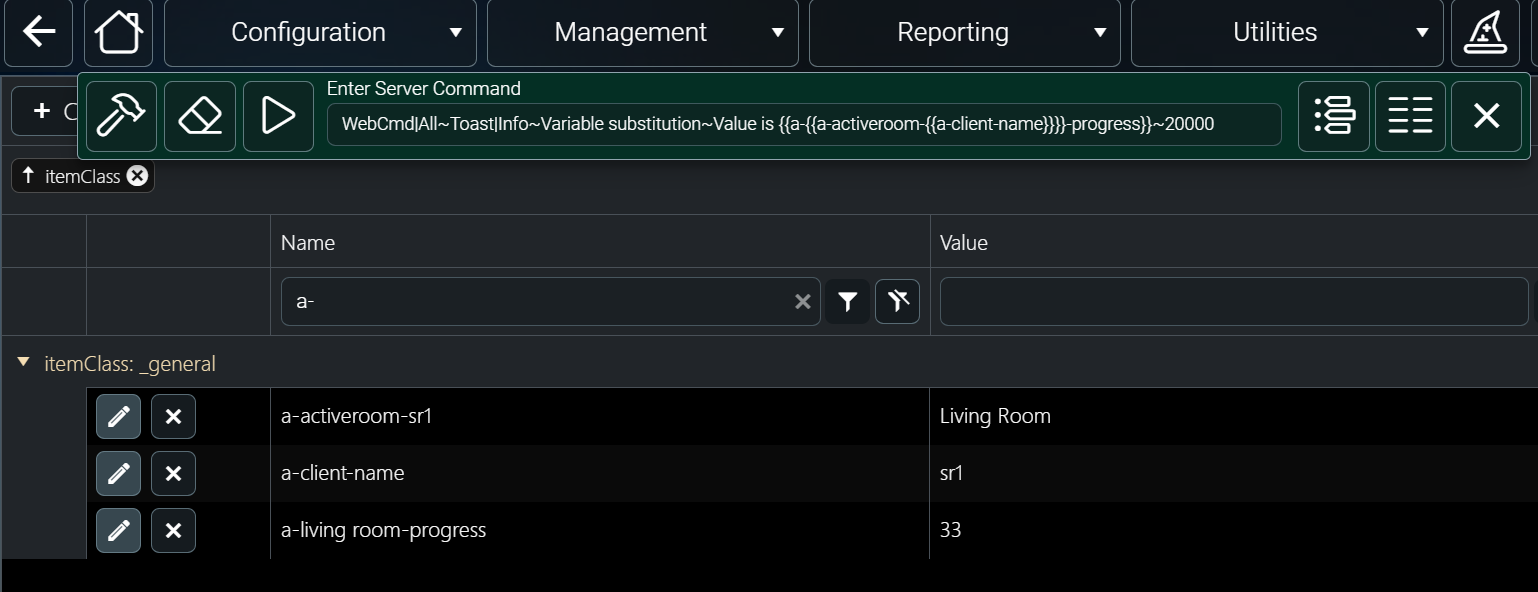
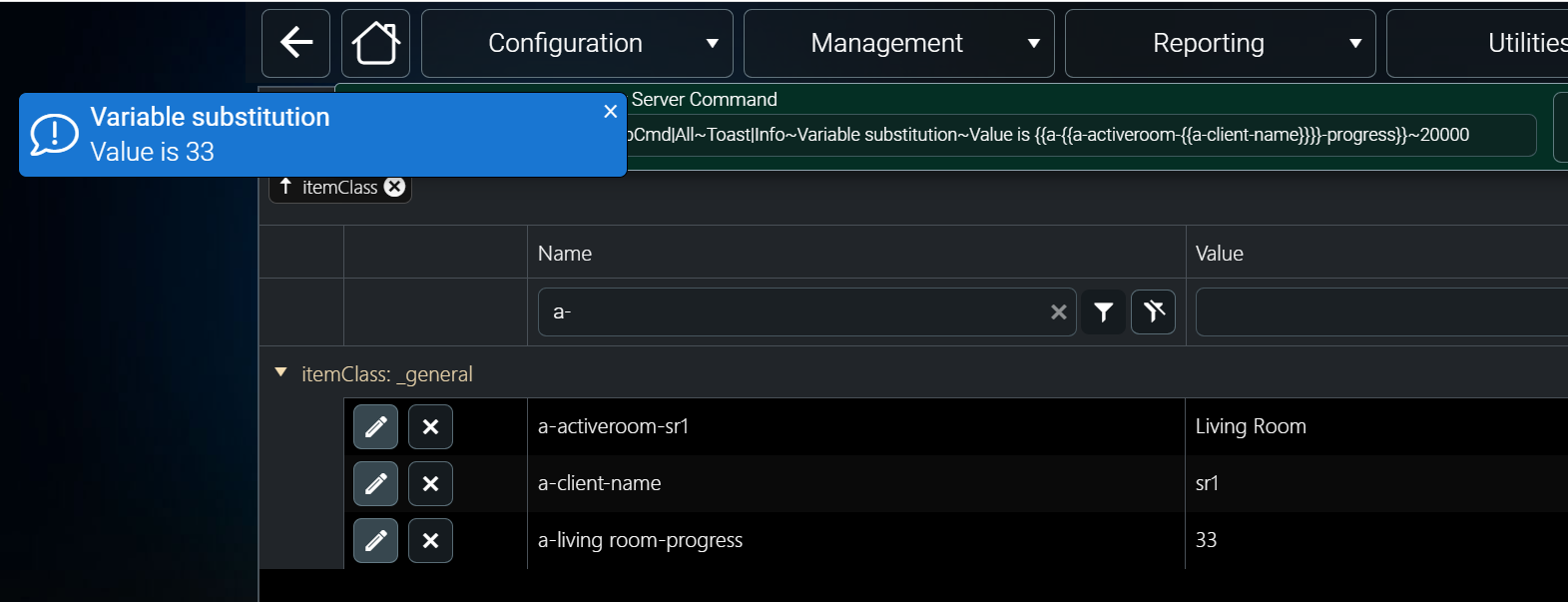
Andrew
Please Log in or Create an account to join the conversation.
Topic Author
Re: Progress bar not updated during macro
2 years 7 months ago
Yeah, I've tried a number of things and my only guess is that when the SetActiveRoom function is called the activeroom_{{clientname}} variable must get re-instantiated at some new memory location and the progress bar is still pointing at the memory for the original activeroom_{{clientname}}.
Here is a test macro that I have:
Macro|
WebCmd|myremote~Show|overlay-busy!
SetVariable|{{activeroom_{{clientname}}}}_poweron_progress~5!
Pause|2!
SetVariable|{{activeroom_{{clientname}}}}_poweron_progress~25!
Pause|2!
SetActiveRoom|Theater!
SetVariable|{{activeroom_{{clientname}}}}_poweron_progress~65!
Pause|2!
SetVariable|{{activeroom_{{clientname}}}}_poweron_progress~100!
Pause|2!
WebCmd|myremote~Hide|overlay-busy!
The progress bar is pointing at {{{{activeroom_{{clientname}}}}_poweron_progress}} and will update correctly until the SetActiveRoom command is run and then it stops updating. So in the above example I'll see the 5% and 25% changes but then won't see the 65% and 100% changes.
Here is the trace output:
09/03/2024 14:42:05.42 · DEBUG · Server.doCommand - macro.test from myremote
09/03/2024 14:42:05.42 · DEBUG · Server.doCommand - WebCmd|myremote~Show|overlay-busy from myremote
09/03/2024 14:42:05.42 · DEBUG · Server.WebCmd - myremote~Show|overlay-busy
09/03/2024 14:42:05.42 · DEBUG · Server.doCommand - SetVariable|{{activeroom_{{clientname}}}}_poweron_progress~5 from myremote
09/03/2024 14:42:05.42 · DEBUG · Server.doCommand - SetVariable|theater_poweron_progress~5
09/03/2024 14:42:05.42 · DEBUG · Server.doCommand - Pause|2 from myremote
09/03/2024 14:42:07.42 · DEBUG · Server.doCommand - SetVariable|{{activeroom_{{clientname}}}}_poweron_progress~25 from myremote
09/03/2024 14:42:07.42 · DEBUG · Server.doCommand - SetVariable|theater_poweron_progress~25
09/03/2024 14:42:07.42 · DEBUG · Server.doCommand - Pause|2 from myremote
09/03/2024 14:42:09.42 · DEBUG · Server.doCommand - SetActiveRoom|Theater from myremote
09/03/2024 14:42:09.42 · DEBUG · Server.doCommand - SetVariable|{{activeroom_{{clientname}}}}_poweron_progress~65 from myremote
09/03/2024 14:42:09.42 · DEBUG · Server.doCommand - SetVariable|theater_poweron_progress~65
09/03/2024 14:42:09.42 · DEBUG · Server.doCommand - Pause|2 from myremote
09/03/2024 14:42:11.42 · DEBUG · Server.doCommand - SetVariable|{{activeroom_{{clientname}}}}_poweron_progress~100 from myremote
09/03/2024 14:42:11.42 · DEBUG · Server.doCommand - SetVariable|theater_poweron_progress~100
09/03/2024 14:42:11.42 · DEBUG · Server.doCommand - Pause|2 from myremote
09/03/2024 14:42:13.42 · DEBUG · Server.doCommand - WebCmd|myremote~Hide|overlay-busy from myremote
09/03/2024 14:42:13.42 · DEBUG · Server.WebCmd - myremote~Hide|overlay-busy
09/03/2024 14:42:13.42 · DEBUG · Server.doCommand - SetVariable|overlay-busy-visible-myremote~true from myremote
09/03/2024 14:42:14.42 · DEBUG · Server.doCommand - SetVariable|overlay-busy-visible-myremote~false from myremote
Here is a test macro that I have:
Macro|
WebCmd|myremote~Show|overlay-busy!
SetVariable|{{activeroom_{{clientname}}}}_poweron_progress~5!
Pause|2!
SetVariable|{{activeroom_{{clientname}}}}_poweron_progress~25!
Pause|2!
SetActiveRoom|Theater!
SetVariable|{{activeroom_{{clientname}}}}_poweron_progress~65!
Pause|2!
SetVariable|{{activeroom_{{clientname}}}}_poweron_progress~100!
Pause|2!
WebCmd|myremote~Hide|overlay-busy!
The progress bar is pointing at {{{{activeroom_{{clientname}}}}_poweron_progress}} and will update correctly until the SetActiveRoom command is run and then it stops updating. So in the above example I'll see the 5% and 25% changes but then won't see the 65% and 100% changes.
Here is the trace output:
09/03/2024 14:42:05.42 · DEBUG · Server.doCommand - macro.test from myremote
09/03/2024 14:42:05.42 · DEBUG · Server.doCommand - WebCmd|myremote~Show|overlay-busy from myremote
09/03/2024 14:42:05.42 · DEBUG · Server.WebCmd - myremote~Show|overlay-busy
09/03/2024 14:42:05.42 · DEBUG · Server.doCommand - SetVariable|{{activeroom_{{clientname}}}}_poweron_progress~5 from myremote
09/03/2024 14:42:05.42 · DEBUG · Server.doCommand - SetVariable|theater_poweron_progress~5
09/03/2024 14:42:05.42 · DEBUG · Server.doCommand - Pause|2 from myremote
09/03/2024 14:42:07.42 · DEBUG · Server.doCommand - SetVariable|{{activeroom_{{clientname}}}}_poweron_progress~25 from myremote
09/03/2024 14:42:07.42 · DEBUG · Server.doCommand - SetVariable|theater_poweron_progress~25
09/03/2024 14:42:07.42 · DEBUG · Server.doCommand - Pause|2 from myremote
09/03/2024 14:42:09.42 · DEBUG · Server.doCommand - SetActiveRoom|Theater from myremote
09/03/2024 14:42:09.42 · DEBUG · Server.doCommand - SetVariable|{{activeroom_{{clientname}}}}_poweron_progress~65 from myremote
09/03/2024 14:42:09.42 · DEBUG · Server.doCommand - SetVariable|theater_poweron_progress~65
09/03/2024 14:42:09.42 · DEBUG · Server.doCommand - Pause|2 from myremote
09/03/2024 14:42:11.42 · DEBUG · Server.doCommand - SetVariable|{{activeroom_{{clientname}}}}_poweron_progress~100 from myremote
09/03/2024 14:42:11.42 · DEBUG · Server.doCommand - SetVariable|theater_poweron_progress~100
09/03/2024 14:42:11.42 · DEBUG · Server.doCommand - Pause|2 from myremote
09/03/2024 14:42:13.42 · DEBUG · Server.doCommand - WebCmd|myremote~Hide|overlay-busy from myremote
09/03/2024 14:42:13.42 · DEBUG · Server.WebCmd - myremote~Hide|overlay-busy
09/03/2024 14:42:13.42 · DEBUG · Server.doCommand - SetVariable|overlay-busy-visible-myremote~true from myremote
09/03/2024 14:42:14.42 · DEBUG · Server.doCommand - SetVariable|overlay-busy-visible-myremote~false from myremote
Please Log in or Create an account to join the conversation.
Re: Progress bar not updated during macro
2 years 7 months ago
When using {{{{activeroom_{{clientname}}}}_poweron_progress}} in the progress bar the bar object is monitoring 3 different variables for changes
{{{{activeroom_{{clientname}}}}_poweron_progress}}, {{activeroom_{{clientname}}}}, {{clientname}}
When you call the SetActiveRoom it is going to recreate the {{activeroom_{{clientname}}}} server variable. The progress bar is going to see that change and that will trigger a rebuild of the gauge. Now, that should not prevent the gauge from working and that is something I will look into. But in the meantime use a different server variable that will be unique to the client but static during the macro. Perhaps {{{{activeroom_{{clientname}}}}_poweron_progress}} becomes {{poweron_progress_{{clientname}}}}
{{{{activeroom_{{clientname}}}}_poweron_progress}}, {{activeroom_{{clientname}}}}, {{clientname}}
When you call the SetActiveRoom it is going to recreate the {{activeroom_{{clientname}}}} server variable. The progress bar is going to see that change and that will trigger a rebuild of the gauge. Now, that should not prevent the gauge from working and that is something I will look into. But in the meantime use a different server variable that will be unique to the client but static during the macro. Perhaps {{{{activeroom_{{clientname}}}}_poweron_progress}} becomes {{poweron_progress_{{clientname}}}}
Please Log in or Create an account to join the conversation.
Time to create page: 0.286 seconds

Copyright © 2026 Allonis. All Rights Reserved.