

Client Support
Smartremote screen "empty" but kind of works on browser


Re: Smartremote screen "empty" but kind of works on browser
2 years 8 months ago
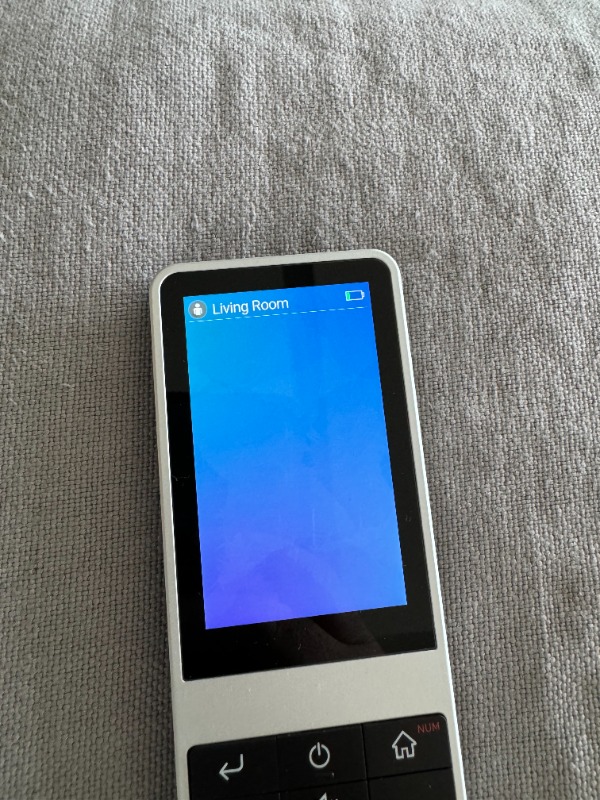
Did you happen to remote in and check? If so did you rename it? I'm still getting the same behavior... I see the sample folder and the "non sample" one, through myDesigner so I guess you fixed that. Nonetheless, the remote still shows "Living Room" and a blank blue screen under.... Through the browser I see the icons for all the sources (even those that I dont have and that popped up at the last update), but clicking them doesnt do anything. Also, if I try to change rooms from the browser I get the "No Data" message like on the remote despite having 2 created rooms (and some that were already there).
Also in the AndroidTV driver power test screen the smart remote is showing a red X...not sure if this has any debug value...
Also in the AndroidTV driver power test screen the smart remote is showing a red X...not sure if this has any debug value...
Please Log in or Create an account to join the conversation.
Re: Smartremote screen "empty" but kind of works on browser
2 years 8 months ago
As an update, I've noticed that the battery indicator on the smartremote hasnt changed at all recently (despite being on the charger for the past 2-3hs...).
Please Log in or Create an account to join the conversation.
Re: Smartremote screen "empty" but kind of works on browser
2 years 8 months ago
I'm getting very weird behavior... I removed and re-added the rooms, removed the sources that I dont have, re-added only a source for AndroidTV and one for Sonos, now I'm getting the "No data" in the browser room selector, and on the smartremote its showing the new rooms I added in place of the ones I deleted... It seems something is definitely amiss...
I dont have a lot of time to tinker right now, can I use your professional services to get this setup? I see an hourly rate listed on the shop but it seems geared towards Bars? Would you be able to get me running with the following setup?
2 Room (Master Bedroom & Living Room).
Each room has the same hardware:
- Cable box (IR)
- Tizen Samsung TV
- Android settop box
- Sonos sound bar (Beam & Arc).
Can you give me an idea of how many hours it would require? I have the wife pressuring me, so I wont have time to learn this as I was planning...
I dont have a lot of time to tinker right now, can I use your professional services to get this setup? I see an hourly rate listed on the shop but it seems geared towards Bars? Would you be able to get me running with the following setup?
2 Room (Master Bedroom & Living Room).
Each room has the same hardware:
- Cable box (IR)
- Tizen Samsung TV
- Android settop box
- Sonos sound bar (Beam & Arc).
Can you give me an idea of how many hours it would require? I have the wife pressuring me, so I wont have time to learn this as I was planning...
Please Log in or Create an account to join the conversation.


Re: Smartremote screen "empty" but kind of works on browser
2 years 8 months ago - 2 years 8 months agoRoy, in the webpage view of the smartremote project, you haven't selected a room and the icons for Unknown room are displayedNo dice... the network is connected correctly, and I was able to reach it via ADB and check the myServer IP is correct and so is the template name...
Edit: the sources highlighted in red just appeared after the last update...
In the Smartremote, you have which filtered all icons out because your devices are not associated to a room.
Yes, we can help you get this all working. I will need to log into the system to see where things are at.
Last edit: 2 years 8 months ago by David Li.
Please Log in or Create an account to join the conversation.
Time to create page: 0.467 seconds

Copyright © 2026 Allonis. All Rights Reserved.