

Client Support
How goes Harmony Hub implementations?


Re: How goes Harmony Hub implementations?
2 years 7 months ago
I see that the Harmony and Smartremote template updates are now available but I don't see a corresponding update to the documentation. I've learned my lesson and I think I'll hold off on this for today lol
Please Log in or Create an account to join the conversation.

Re: How goes Harmony Hub implementations?
2 years 7 months ago
Please hang in there. I'm doing final testing on another server and finalizing the documentation. It should be ready soon. I'll announce it here when it is ready.
Please Log in or Create an account to join the conversation.
Re: How goes Harmony Hub implementations?
2 years 7 months ago
It's all good. I've got other things that I can be working on today.
Please Log in or Create an account to join the conversation.
Re: How goes Harmony Hub implementations?
2 years 7 months ago - 2 years 7 months ago
The Harmony driver is released. Make sure you have the latest driver, server and SmartRemote template. The HowTo button in the driver will take you to the documentation. Please follow it closely. An accompanying YouTube video is in post-production and should be up soon.
ATTENTION!
If you have previously installed the Harmony driver please make sure you delete all your existing harmony devices in the driver page (use the Harmony|RemoveDevices command), then go to the Sources & Apps page and delete any Harmony sources you might find there. Finally, go to the Macros page and delete any activate-source macros that might have been tied to those old Harmony devices.
Do this before updating to the new driver. You have to start with a clean slate before moving forward.
Let us know how it goes.
ATTENTION!
If you have previously installed the Harmony driver please make sure you delete all your existing harmony devices in the driver page (use the Harmony|RemoveDevices command), then go to the Sources & Apps page and delete any Harmony sources you might find there. Finally, go to the Macros page and delete any activate-source macros that might have been tied to those old Harmony devices.
Do this before updating to the new driver. You have to start with a clean slate before moving forward.
Let us know how it goes.
Last edit: 2 years 7 months ago by David Li.
Please Log in or Create an account to join the conversation.
Re: How goes Harmony Hub implementations?
2 years 7 months ago
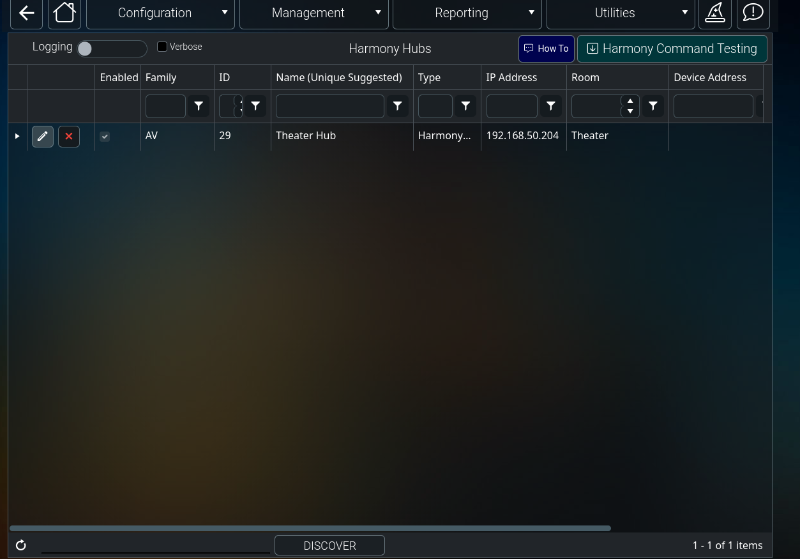
I'm not having any luck adding my hubs. The discover button doesn't return anything. When I use the addhub command, it populates the info but never the activities or devices.
Please Log in or Create an account to join the conversation.

Time to create page: 0.402 seconds

Copyright © 2026 Allonis. All Rights Reserved.